Tuesday, 6 January 2026

From Kubuntu LTS to Fedora 43 KDE on my Dell Latitude 7300

I was having some weird trackpad issues on Kubuntu LTS on my Dell Latitude 7300, there were random right or left clicks happening while using it, both while I was moving the cursor myself and while typing. Disable trackpad while typing was enabled so it was not that. It got so infuriating that I decided to try another distro, and so I decided to try Fedora KDE, since I had read that KDE support has improved a lot in Fedora recently. It's also been awhile since I tried Fedora. 

As with most modern distros, it's pretty easy to install and doesn't take too long, especially on a reasonably powered machine like this one. This is what I was greeted with on the first login. It's a fairly stock looking KDE other than Fedora Kicker icon and becomes more stock when you apply a default KDE theme. Breeze Dark is always my usual choice for KDE. I think it uses the same or close to the same version of KDE Plasma desktop as KDE Neon, currently version 6.5.5, which is a fair bit newer than Kubuntu LTS. On the plus side it should have a fair few things fixed, but it may be a little bleeding edge.


And here's how I set it up, I have added more virtual desktops, moved the panel to the top and changed the theme to Breeze Dark. This is pretty much how I setup KDE on all my machines.


Apart from web browsing, (using Chrome, there's an rpm available on Google's download page) I mostly use my laptop for image editing with GIMP and a little bit of video editing with Kdenlive.  To get libx264 output working, I did a bit of Googling and installed the RPMfusion repos and installed libavcodec.


Once I did that, Kdenlive could now export to x264 video, and many other options. Updates on the KDE edition of Fedora are handled by KDE's Discover, just like Kubuntu, or on the command line using dnf instead of apt, using these commands to first check for updates and then install them: 

sudo dnf check-update 

sudo dnf upgrade   

I've installed all my usual apps such as Audacious for playing music, VLC and MPV for video playing,  and Soundkonverter for converting media along with qbittorrent and Filezilla. One slight annoyance I had was sending a file to my Android devices with KDE Connect failed for some reason. I disabled the firewall in case that was the issue but that did not work, but then it  turned out that it was SELinux being too restrictive. Disabling it or turning it down a bit will do the job, allowing KDE Connect to work. To disable SELinux, edit /etc/selinux/config with your favourite text editor and set SELINUX=disabled and then save, exit and reboot. Also Mkchromecast (for casting audio to Chromecasts) is not available in the Fedora repos so I need to look into how to get it.

Another slight annoyance I have had is getting used to a much newer version of the image editor, GIMP, as the devs for some silly reason have made it so that the default paste is now as a single layer, rather than a floating layer, which is now in the paste sub-menu. "Paste into selection" is now "Paste as floating layer into selection" - very inconvenient!  GIMP has also crashed several times, mainly when it's been left open for a long time, especially between Suspend and Resume. Also, GIMP no longer remembers the last font used in the text tool.


So far, Fedora 43 KDE has been performing much better than my many previous attempts at using Fedora, usually I use it for a few days and find it to be too buggy or there's a big showstopping bug that drives me back to my previous distro.  It's been over a week and I'm still using it and everything is working fine so far, a lot more stable than when I have previously used Fedora.  It's unusual that the only issue I have with this Fedora version is actually just an issue with the latest GIMP. And I've yet to encounter the random trackpad clicks that I had in Kubuntu either...


Tuesday, 26 August 2025

Switching from KDE Neon to Kubuntu

 After many annoying little bugs and freeze-ups on KDE Neon User Edition, I decided to ditch KDE Neon for Kubuntu LTS. Neon is just too flakey to use as my main distro, it really is best to only use for testing the latest KDE features. I switched one of my other laptops, a Dell Vostro, over first before switching my 7300 first, just to make sure it worked OK, which it did. KDE on the LTS now has all the features I need and want on my laptops.


It was a painless install from a USB stick to my Dell Latitude 7300, and I have mainly just installed the essential apps I use such as Gimp, VLC, Filezilla etc plus kubuntu-restricted-extras, and this time I have installed Plank Reloaded to use as my dock at the base of the screen instead of customising a panel, and it seems to be working well so far, no show-stopping bugs yet. As usual the first thing I did was switch to Breeze Dark theme and also chose darker themes for login and lockscreen too.

There has also been a firmware update for my Latitude 7300 and that seems to have installed and stayed installed.  I haven't switched over my main desktop yet as that will require much more configuring and the weather has been too hot recently to switch it on! I've also been looking into getting a more powerful machine to replace it too. Not sure but i think Plank Reloaded was causing graphical issues so I removed it. Also occassionally still get some odd graphical glitches, not sure why it is still playing up, I shall have to keep investigating, but for now I shall keep Kubuntu on this Latitude and the Vostro.  

Wednesday, 7 May 2025

Upgrading From My Thinkpad T430s to a Dell Latitude 7300

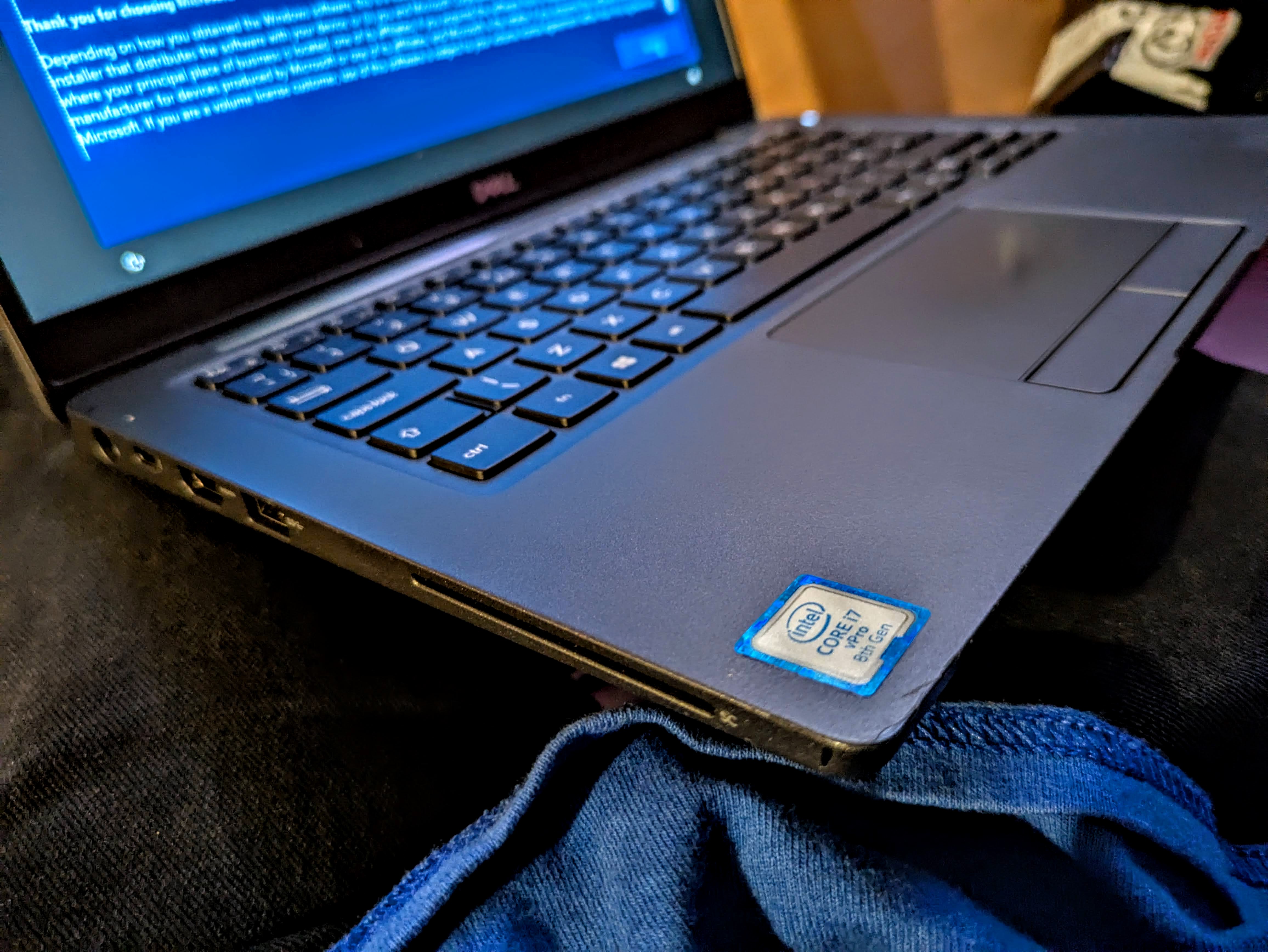
My Lenovo Thinkpad's battery and it's internal battery are both dead or close to dead and I think possibly the power supply connector maybe dodgy too, so I was in the mood for an upgrade. I found this Dell Latitude 7300 on eBay from a reputable seller. It has a 8th gen Core i7 CPU and 24GB of RAM (8GB+16GB modules) which is more than any other machine I have, including my main desktop which only has 12GB of RAM. Cosmetically the only noticeable wear I have noticed so far are the long rubber feet it sits on are hanging off a bit, just needs gluing back on at some point.   

I had a good look through the settings In the BIOS and only needed to enable SMART reporting for drives. I noticed lots of useful settings in there, you can disable the webcam, mic, change backlit keyboard settings, enable boot from SD card etc. That's the optional MicroSD card reader, which is nice, though for me a full size one would have been more useful, but I suppose they went for that to save space, which is also obviously why Ethernet is missing too. I may buy a USB C Ethernet and card reader adaptor for it at some point. With slightly less ports than I am used to it does mean that the 7300 is very light compared to my old Thinkpad. Obviously having no optical drive also saves a lot of space and weight, it's not something I use often other than on my desktop machines. There's a USB 3 port on each side, a HDMI port and USB C for charging, alongside the old barrel connector for the old style power supply. And apparently you cannot damage the machine by plugging in both at the same time. This one came with a fairly compact LITE-ON USB C power brick. There's the usual Kensington lock connector, and also a Smart Card reader which I doubt I will ever use. This is the first laptop I have ever had with USB C charging, which I like because my phones use it too, so it makes things easier. 


The 7300 came with Windows 10 on it's 128GB NVMe SSD but there was no way I was keeping that garbage on this. I thought about upgrading the storage but just wanted to get Linux on it as quick as possible, I think 128GB should be fine anyway. 

I wiped out everything and installed KDE Neon. Everything went smoothly but I advise not leaving it long enough during the live session for the screenlock to kick in, because for some silly reason it requires a password, yet the Neon live user does not have a password set. If this happens, wait long enough for the install to have finished, then shut it down, or CTRL+ALT+F2 to a terminal and reboot it form there, that's the simplest solution. 


Anyway, the install didn't take long and upon reboot I had a nice crisp fresh KDE Neon install. And KDE really does look crisp on the 1080P LED screen, it's pin sharp, and feels much sharper than the one on my old Thinkpad, and has much better colours, the black actually look black! I switched the global theme to Breeze Dark as I find dark themes are easier on my eyes. And lastly I put the main panel at the top and a dock-like panel at the bottom of the screen.

I installed yakuake terminal VLC, Audacious, kubuntu-restricted-extras, gimp, wxMp3gain, krdc (remote desktop client) soundkonverter, synaptic (alternate package manager). KDE reports the battery health as at 69%. I have also installed lm-sensors as per usual and all temperatures are just fine under light usage though I did get a bit worried at one point while Dropbox was downloading loads of files and with a few tabs in Chrome, temperature on one core went up to just over 70, though that's still in acceptable figures according to Dell's site, and it hasn't happened again. It usually hovers around the 30 to 40 C area. I have also  changed the updates in Neon to the non-bundled variety, as it should be.  To disable offline updates, edit the config file /etc/xdg/discoverrc - for example using nano - and set it to off. Another tweak I do is add the 'Show Logout' and 'lock screen' options to the desktop right click menu.


Everything works out the box as with most Latitudes I have had, the keyboard and trackpad are decent, much better than on my old Thinkpad and is in good condition too. The backlight works fine, it's something I feel I cannot live without on a laptop or desktop these days. If you need to change the Fn key behaviour, pressing Fn + Esc toggles the Fn lock, allowing you to use the F keys without the Fn key.


For many minutes I thought there was something wrong with the webcam, but after a bit of googling I discovered that there's a simple little slider switch next to the webcam to enable and disable it. Although there are some KDE specific webcam tools, I find the app called Cheese is the best standalone Linux webcam app, it's very simple to use. It's not great quality compared with a smartphone camera of course, and not something I will use much, but it's nice to know it works. 

One slight annoyance is Discover keeps nagging me about a UEFI dbx update, and every time it supposedly updates, it still comes back again on reboot. I have tried updating on the commandline but I get an error, and I've searched online and not found a solution yet. 


On one cold boot it even did a firmware update but that has not made a difference. 


Update 30/06/2025 - A recent update to Neon has now fixed that UEFI dbx update issue.

Another bit of strange behaviour I had was when I closed the lid, it did not suspend/sleep, and continued to run as if the lid was never closed, which, if left for awhile, made the fans go full blast trying to keep it cool. After a bit of Googling I discovered that the previous owner had disabled the Lid Switch in the BIOS. 


Also one time when I manually Suspend I came back to find it had shutdown at some point, despite having plenty of battery left. I had just done some updates on KDE Neon so that could have caused that issue. When it does suspend and resume, it does so very quickly.


Overall I am very pleased with the Latitude 7300, it has a very nice bright screen, nice backlit keyboard, decent touchpad, and it's the first laptop that I have had that is significantly faster than my main desktop, in every way except possibly in graphics card power. It has twice the RAM and a much newer processor. The only thing of course is I do prefer the dual monitors on my desktop, though I could attach a monitor through HDMI.  I've mostly been using it for all the usual stuff I would do on my desktop, web browsing, image editing in GIMP, and bit of video editing in Kdenlive.  It's been particularly useful n the very hot weather when I don't want to run my main desktop machine. Hopefully it should last me awhile, and it runs so quickly I feel like I need to get a new workstation to match it! 


Monday, 16 December 2024

From Google Pixel 4a to Pixel 8a

Well my Google Pixel 4a's battery has become so bad that 5 or so minutes of video recording is enough for it to shutdown, and much like my first gen Pixel years ago, it can no longer determine the true state of the battery. So I needed a replacement phone, and well...I wasn't going to go back to using my Pixel 3a, that's even older and out of support I think. Anyway, it happened to be my birthday and Black Friday was  upon us, so it was a good opportunity to upgrade. For me another Pixel device was the best choice, I have got used to all the Pixel-only features, the amount and quality of the updates and most importantly the lack of bloat! Stock Android is essential for me. The 8a was on sale at a decent price on Amazon and it arrived very quickly. Interestingly, purely by chance, it arrived at the same date that my 3a arrived five years ago, but then I got my Pixel 4a not long after that, so the 3a became the backup device. 


Unlike my 4a that Google sent me for free, which arrived in a fancy box with extra stuff, the 8a arrived in a very small box with no charger. I presume most phones do not come with chargers these days, but luckily I still have the original chargers from both my 3a and 4a. In the box there was a charging cable and the usual little metal SIM removal tool and little USB adaptor used for direct transfer between phones I think but I've never used them. I put the phones side by side and went through the setup process, including the settings transfer, wirelessly. One annoying thing is the process never syncs the state of my data settings, it always leaves 4G on. When left on it cost me 2 quid a day because I am on PAYG. After the initial transfer, I then updated the 8a to the latest version of Android, version 15 (my 4a is on Android 13).  


It is going to take awhile to get used to the fingerprint sensor being in the screen rather than on the back. In some ways it's more convenient, such as when it's flat on a table but it's not quite as reliable as the old rear mounted one. Combining with face unlock helps a little, when there's enough light for the camera to see at least.


One of the first things I noticed is they've nerfed the camera app, some of the advanced quality settings are missing and it seems the photos are not the highest the camera sensor can take, at least from what I understand. The Pixel 8 and 8 Pro have 50MP cameras, but the 8a shows "64MP effectively 16MP" on GSM Arena. Apparently you have to get the 8 and 8 Pro to get the much higher quality and more advanced settings. Bogus! The 8a has a fantastic camera sensor restricted down to a much lower quality. However, it does take better photos than the 12MP 4a at least so it's still an upgrade for me. And Night Sight is still brilliant too.


I've also discovered that from the Pixel 5 series, Google has stopped unlimited uploads of videos and photos to Google Photos, so photos taken with my Pixel 8a now take up space whereas those taken with my 4a or 3a don't. This is especially important with videos that can take up a lot of space. One workaround is to turn off uploads and copy the files to my older phones and let them upload the videos and photos, but that's a bit of a faff. Also, I wish they would not keep changing Google Photos, right now if you edit a photo in the phone app, you have to save it as a new file, which means taking up more space unless you delete the old one, so editing takes longer. In the Chrome app you can just save it over the original file, that's the default, as it should be. 


The front facing selfie camera is a huge upgrade from the Pixel 4A. At 12 megapixels it's the same number of megapixels as the rear camera on the 4a and I finally get to have slow motion on the selfie camera, which is nice. There's a couple of features on the camera I've not had on a phone before, a wide angle lens in addition to the main lens, and the long exposure feature in the camera app, which is good for creating light trails. 

Long Exposure

Night Sight and Long Exposure


Wide Angle

It's the first phone I've had that has no headphone jack but I've been using Bluetooth headphones for a long time with my phones, so I'm not too bothered, and I could use an adaptor if needed. The lack of headphone jack presumably helps give it IP67 dust/water resistance. Also The speakers on the 8a sound noticeably better, a little louder and fuller sounding I think.


Battery life has been great so far, lasting all day, when I've been out with just 50% battery I've still managed to get through the day without charging. I am determined to look after the battery better than than I did on the 4a, but whether it works in the long term we shall see. I intend to try not to use Quick Charging as much. As i was writing this review, the December feature drop came out, which should help me look after the battery, it added Battery Bypass, the ability to stop charging at 80%. I'm currently charging about once a day on my average usage. 

So in conclusion, I am pretty happy with my Pixel 8a, other than the dumbed down camera app quality settings, but then I am not sure what else I could have bought instead. There certainly wasn't the budget for the 8 Pro, and there's not many other decent competitors at this price range without bloat. Hopefully this 8a will last me another 5 years or so and I'll see what Google has to offer when this phone needs replacing. 


Monday, 10 June 2024

How To Install Mkchromecast on Ubuntu and Ubuntu based Distros

Mkchromecast is a way to stream any sound from your desktop to your Chromecasts, which to me makes it a lot more useful than the Android app for streaming, particularly for streaming offline music to the no longer made Chromecast Audios. Just like Google Home, you can stream to just one or to a Home Group. As per my previous article, I was using Mkchromecast on Manjaro until recent updates killed it, so I switched that particular laptop to KDE Neon, which is my favourite distro. Anyway, here's how to install Mkchromecast: 


Firstly, install git, and then download Mkchromecast from git: 

    sudo apt install git

    git clone https://github.com/muammar/mkchromecast.git 


Then, switch to the mkchromecast directory and install the dependencies:

    cd mkchromecast

    pip install -r requirements.txt


Then install Mkchromecast

You can install from Discover or with apt (sudo apt install mkchromecast) and now it should work fine. I usually use mkchromecast -s to scan for devices and choose my Home group to stream all simultaneously. It's a shame Google discontinued the Chromecast Audio because it works pretty well, and is much cheaper than expensive streaming solutions like Sonus.


Tuesday, 21 May 2024

From Manjaro to KDE Neon on My Dell Vostro 3300

So there was a huge update on Manjaro recently to KDE plasma 6 and it killed Mkchromecast again on my Dell Vostro, but this time I wasn't able to get it working again. However I worked out how to get it working in 'buntu based distros, so I decided to switch it to my preferred 'buntu-based distro, KDE Neon. Neon is based on the Kubuntu LTS but with the latest KDE installed. The installer was even easier and smoother than it used to be, so after backing up stuff I wanted to keep, I installed Neon in about 5 or so minutes. This machine has an old hard drive but it still feels fairly snappy to use. 


One of the first things I like to do with KDE now is turn off the stupid Offline updates setting. Seriously KDE devs, this isn't Windows, I don't want or need to have updates run on shutdown! Linux doesn't need to reboot for most updates! I also switched to Breeze Dark theme, and moved the panel to the top, disabling the new floating panel setting. That's what I like about KDE, everything is configurable, unlike Gnome where they have a like it or lump methodology. And the search feature in Settings works very well. Also I discovered that my Dell Vostro has a back-lit keyboard, I accidentally hit the Fn keyboard shortcut to turn it on! 


I also installed all the usual items such as GIMP, Audacious music player, FilezillaCantata (mpd front-end) Yakuake (a drop down terminal) and Kubuntu-restricted-extras. In general this fresh install has gone very smoothly compared to an upgrade, though I did have a slight issue with menus not popping up from the system tray, Switching from Wayland to X11 at the login screen sorted that out. Another little tweak I do is re-enabling the Leave option in the desktop right-click menu. So, other than that slight issue, this fresh install has gone very smoothly, and I'll likely keep KDE Neon on this laptop until the hardware dies whenever that might be, this Vostro is a tough old thing.


Wednesday, 6 March 2024

Upgrading to KDE Plasma 6.0 - a rocky start for KDE Neon User Edition

When I read about the first stable release of KDE Plasma 6, I thought I'd probably just wait awhile until I try it, but of course I forgot that KDE Neon User Edition would get it so soon.  Well, the update happened and the first thing I noticed, on my main desktop machine, was that for some reason the onscreen keyboard came up on the login screen, large and covering half the screen! To fix this I found a solution on a forum, which entails editing sddm.conf like so:

sudo nano /etc/sddm.conf

and then add 

InputMethod=

Save and exit and the onscreen keyboard shouldn't appear again on the login screen. Also it's a rather basic login screen for some reason, no matter which theme I choose. Update - switching to the default Breeze login theme fixes this.

Then I noticed that Wayland was set as default again, after I tried to login and it wouldn't work. Nvidia is the reason for this, but thankfully X11 is still an option and that works. Then on the first few logins I noticed a lot of little errors I think some parts hadn't updated, so a quick trip to Discover, the package manager to make sure everything got updated was needed. And then a day or so after i updated, there was some major bug fixes, which has made things better but i am still getting the odd Plasma crash, usually after logging in and opening Chrome for the first time. Right now the desktop seems to have has settled down and actually feels a bit snappier than Plasma 5 was. I am still getting the occasional error and a few graphical glitches, black screens occasionally., 

KDE Activity manager constantly crashed with the "kactivitymanager closed unexpectedly" error.until I found a solution,  Navigate to ~/.local/share/kactivitymanagerd/resources and delete database, database-shm and database-wal. You will lose your favourites in the KDE menu but at least the annoying kactivitymanager won't keep crashing! Amother odd thing is that the Print Screen key does not open Spectacle anymore.   

Another minor issue is that since Plasma 6 is qt6 based, so Latte Dock no longer works, and will never be updated since it's been abandoned by the lead developer. A shame because it's been my favourite OSX-style dock for years. For now I have added another KDE panel, auto-hiding, and using the new floating panel feature. It's not exactly pretty, but it's functional. I shall miss the magnification effect from Latte, and I can't seem to get the panel to go translucent, even though I have set it to. Floating panels are default now, but to me they look odd on the normal panels so I have disabled them for those. Another minor niggle is that Dolphin always opens without the sidebar even though I closed it with it open. It used to remember my choice. 

On my main laptop, a T430s Thinkpad, the update installed more smoothly, there was no kactivitymanager errors but still have the same basic login screen and had to disable the onscreen keyboard like with my desktop machine. No graphical issues of course, because it's got Intel graphics. One thing I have noticed changed is that when I close the lid then open it again, the keyboard backlight now goes off instead of remembering which setting it was on. My laptop does not have the Dolphin sidebar issue though.

The KDE Neon developer blog has put up an apology for the number of issues with KDE Neon User Edition. Apparently the testing and unstable versions have been running more smoothly. Hopefully they'll send out more fixes soon.

You can read more about what's new in KDE Plasma 6 on the KDE website