Showing posts with label osx. Show all posts

Thursday, 14 June 2018

Goodbye Linux Mint... Back to macOS

I have spent the last 6 weeks in the world of Linux, by running Linux Mint 17.3 Cinnamon on my MacBook Air. I have had an interest in Linux for a long time, but for me macOS is where it is at.


I gave it a good shot, but gone are my days of tinkering. I am more a user now. I just want something that is going to get what I need done in the shortest and easiest time.

After 20+ years of using a Mac at home, it has become second nature to me. I know MacOS/OSX/macOS inside out. I know the software, I know the hardware and I like the 'it just works' approach they have.

I feel a little disappointed that I have pushed Linux aside, but why learn a new OS, new way of operating and a bunch of new software - when I have 'old faithful' that I know.

So today I took the task of removing Linux Mint from my MacBook Air and giving the partitions back to macOS. On a Mac that is not an easy task. While creating partitions was easy, removing them was not. I had to clone my Mac partition to an external drive, boot from it, wipe the internal and then clone back.

I will keep my finger in the Linux pie and if I ever found myself without Apple hardware, it would be my first choice over Windows, but whilst I have a Mac - and one that is more than capable of running the latest offering from Apple - I might as well carry on using it as the Cupertino giants intended.

Goodbye Mint, its been a fun ride, but I am now back in the Apple camp.

Written by Simon Royal. Follow me at twitter.com/simonroyal


Monday, 12 August 2013

REVIEW: Elementary OS "Luna"

I decided to try out the recently released latest version of Elementary OS, Luna, just out of beta, which is based on Ubuntu 12.04. I used unetbootin to image the 64 bit ISO onto a 1GB USB stick I use for testing. Running the OS from the USB I found it quite snappy, so I installed it on my Dell Latitude D430 laptop. The installer is pretty much the same as Ubuntu and within 10 minutes I had it installed and rebooted into a fresh desktop. There's a panel at the top of the screen with Applications menu and tray etc, and a dock at the base of the screen which I think is called Plank, it's nice as it's similar to Cairo Dock which I usually use. The Applications menu is nice and simple, and searchable.


The default web browser is super-lightweight Midori, but you can easily install Firefox or Chrome. I found when installing software it's best to open Software Sources in Software Centre first, (rather than trying to install them in the terminal straight off like I tried to do) and enable the extra sources so you can get VLC and other useful packages.


One thing that strikes me about the desktop is it's not immediately obvious how to view virtual desktops, but with a quick Googling I found this handy list of shortcuts for Luna. You can minimize apps by right clicking and selecting Minimize as there's only the Close X on the left of the Titlebar and an Unmaximize button on the right side. I've also discovered that you can create Hot Corners to make things easier by going to System Settings - Desktop - Hot Corners. I have the bottom right corner set to Workspace Overview and the left corner as Window Overview. You could also set one corner to Minimize the current app. Update: You can change the button arrangement and bring back a Show Desktop button on Plank, amongst lots of other useful tweaks, with the very useful Elementary Tweaks plug-in.


For some reason, no resource monitor is installed by default, I usually use top or htop but for newbies there needs to be a user-friendly graphical app installed. Also there does not seem to be a way to make bookmarks in the sidebar in the file manager nor apparently a way to make a shortcut elsewhere either. BTW, if you need to open a root file manager it's sudo pantheon-files. Update: Right click on the Files icon on the dock and select "New Window As Administrator."


The default music app is called "Music" in the dock but I think is actually called Noise. My new favourite music player however is Sayonara, which is a nice lightweight music player, which I've installed via the 64bit deb package. Also there does not seem to be a CD/DVD burner installed by default, easily fixed though.

Music


Sayonara


There's a text editor called Scratch, a mail app called Geary (I mostly use Gmail so I'll probably never use it) and the default video player is Movie Player, but I've changed that to VLC, and Shotwell is the default photo viewer/manager. I have also installed a few extras such as Guake, a drop-down terminal.


Installing WINE means a lot of packages to install!


Overall I really like Elementary Luna, it's pretty smooth, the Applications menu works well once I discovered and got used to the keyboard shortcuts, virtual desktops work really well. It's also nice and lightweight, it feels and looks smoother than Xubuntu and is much lighter on this laptop (Core 2 Duo, 2GB RAM, Intel graphics) than KDE or Gnome. I've even started liking Empathy messenger, I like the way it notifies me in the dock. The file manager needs a few tweaks, especially a way to make shortcuts in the sidebar and there needs to be a GUI system monitor installed by default, something more lightweight than Gnome's would be great. The login screen is beautiful but I wish the boot splash was more animated to show it's working. Other than those minor points I'm quite impressed with it and I am happy with my Luna install on my D430.


Update 01/09/2013: Only one minor problem I have been having, every time I boot into Elementary the dictionary is stuck on Cuban, and I change it to English but it only lasts for that one session. Also Empathy won't sign into Facebook chat anymore so i've switched to Pidgin.
Sunday, 28 July 2013

Updating Maps and Exporting Custom Routes From Google Maps to Garmin GPS Devices


I've been helping to setup a Garmin Nuvi 2445 SatNav for a friend, including updating the maps and planning some custom routes, and I've found the process to be a little frustrating. To check for map updates and OS updates a browser plugin from Garmin is needed, but it does not support Firefox on Linux but works with Firefox on Windows and OSX. It also thankfully supports TenFourFox on OSX PowerPC. I updated the software on the device using it but then it needed Garmin Express, which has to be one of the worst programs I have ever encountered. It only works on Intel Macs or Windows and it barely seems to work! I tried about a dozen times and it still failed to download and install the latest maps. Having Googled around for a bit I found out that the older Garmin software, Map Updater, is more reliable, though sadly Windows only, but I finally managed to update the maps.

Next up I needed to export a route from Google Maps to the Garmin. For a few days or so this worked fine, just had to go to Google Maps, make a custom route, click Link, then Send and select Send to GPS. Then suddenly yesterday without warning, Google Maps lost the GPS option. This has meant looking for another way round it. I tried other online maps services but none of them worked the way I wanted.


With a bit more Googling I have discovered Tyre To Travel, and a useful how to on YouTube. Sadly it's still Windows-only, and does not work in WINE (despite what it said on their website), so I'm still looking for a possible Linux option.


The Garmin Nuvi device itself has actually worked well with custom routes, the key to having working custom routes is having plenty of Waypoints, otherwise the device figures it's own route out. Once you have them exported over, you need to go to Apps, route plotter/planner and load the one you want. When Google Maps had the export option, the Garmin plugin sent the route to Favourites too but not so with other software. Interestingly, the OS of the Garmin seems to be Android based, a custom version of Froyo or Gingerbread judging by the lockscreen. It's just a little annoying that for a company that uses a Linux-based OS that they have yet to release any software for desktop Linux, or at least make their browser plugin OS-agnostic. At least my Powerbook comes in handy as it can at least access the storage of the Garmin, which for some reason does not show up on Linux.


Thursday, 4 June 2009

Imitation is not always the sincerest form of flattery


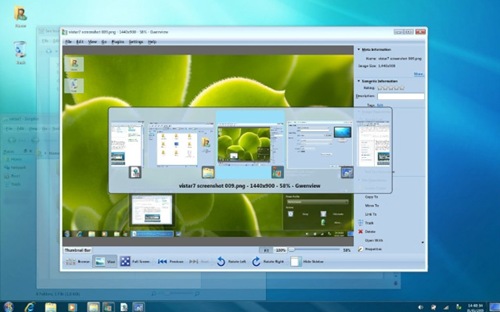
Monstrosity: Windows 7 Theme for Linux

I've occasionally seen a red Fiat Coupé with Ferrari badges all over it. It looks pretty tacky and unconvincing, yet on various desktop customisation pages such as Gnome-Look, Stardock and others, I've seen countless themes that emulate the complete look of another operating system.
Why would you want Linux to look or work like a hideous bloated and buggy closed-source operating system? I've also seen Ubuntu brown themes for Windows, whilst it's nicer to look at than Windows XP and Vista default themes, why not just use Ubuntu, at least in dual boot? I also find the lack of themes on OSX to be a little irritating, what if i don't like brushed metal? The only feature of Mac I emulate in Windows (on the rare occasions I boot into it) and Linux is the dock. For Linux I use Cairo Dock and for Windows I use Object Dock. This is only because I like the way it works and keeps all my favourite programs close to hand. I just don't want my whole desktop to look like or work like OSX, the Starbucks of OS's, or the Mcdonalds of OS's, Windows.