Having successfully transferred the Ubuntu system between desktops, I wondered whether it would work with other mixed systems. the opportunity came when I repaired a HP nc6000 laptop, and on having a faulty DVD drive, and not having a spare I used an unorthodox method of getting a working system on it. I installed the Ubuntu 8.0.4 live CD on the hard drive connected to a USB/mini IDE converter to my pentium 3 750mhz test-bed machine, then put the drive back in the machine when the install had completed but before the reboot to the new system. On booting up in the laptop it worked fine, with no problems! I wonder what would flummox a Linux install! After installing the ATI drivers and adding another 256MB of ram, Compiz works great on it.
Monday, 8 September 2008
Another Reason Why I Love Linux!
Recently I built a 'new' PC from various bits and pieces: a Foxconn socket 939 board i had lying about, with 2.4ghz single core CPU; 2GB of ram (made up of four 512MB modules running in dual channel mode) and I put in an 80GB drive for Windows. Of course, I had to do a fresh install on it as it has a different chipset than my old machine (Nvidia as opposed to SIS on the old Asus board) though both machines use Athlon 64 bit CPUs (2800+ socket 754 and 3800+ X2). So once I had afresh install it came to thinking about how to transfer all my settings and things for Ubuntu. Instead of the tedious approach of reinstall then re-downloading all my programs, I decided to risk just moving the hard drive straight into it, and just repairing Grub with Super Grub Disk Imagine my surprise when it worked perfectly without any problems! I'm writing this on it now. Now you can't do that with Windows without a whole lot of messing about, I didn't even have to uninstall anything!

Saturday, 2 August 2008
Steve Ballmer and The Grim Reaper - the likeness is uncanny!
 Steve Ballmer and The Grim reaper (as portrayed in Bill and Ted's Bogus Journey)
 Saturday, 21 June 2008
Hooray! Vmware now works on Ubuntu 8.0.4!
 As you can see, the latest 6.0.4 version of VMware Workstation now works perfectly in Ubuntu Hardy Heron without any kernel patching. Also you may notice I'm running Mac OSX Tiger in VMware! I downloaded an already setup VMware image, but there is a how-to here.
Update: It works not quite perfectly, at the moment it needs configuring everytime I reboot, which is annoying!
Update 2: Sorted! it seems an ubuntu kernel update has fixed this issue, its work fine now.
Monday, 19 May 2008
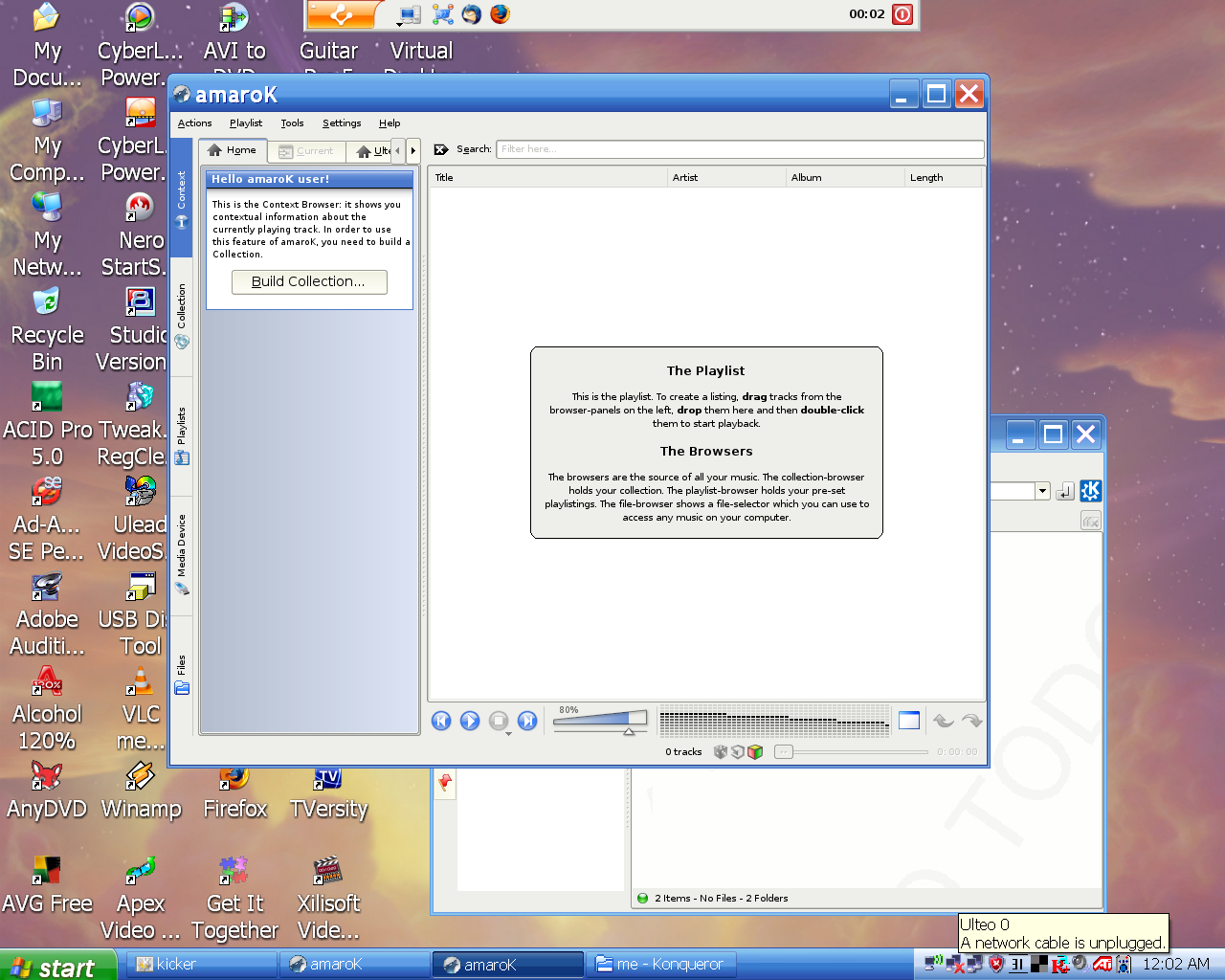
I've just recently tried Ulteo's Virtual Desktop which is a nice integrated way of running Linux applications on Windows. it is based on Colinux (co-operative Linux, but I've found out it was a bit fiddly and not as smooth as Ulteo. The only problem with UVD is it needs a good internet connection all the time, I just wish Colinux was as smooth as Ulteo.
Wednesday, 14 May 2008
Ubuntu + Firefly + Amarok = bliss
For awhile now I've had an Itunes compatible music server in the form of open-source Firefly (previously called mt-daap) on Ubuntu (Gutsy and Hardy). It takes a little setting up, but you can grab firefly from Ubuntu's repositories make sure you have Apache running for web configuration. There's a nice tutorial here, and plenty of others with a little Googling. Update 05/11/81: the link is dead, try this tutorial (which is based on Ubuntu)

On either the host machine or another Linux PC on the network, you can use Amarok (daap shares should be available under 'Devices' along the left hand side, enter password if you set one up.) or you could use Rhythmbox or Banshee if you prefer.
On Windows you could use Itunes of course if you don't mind the bloat, but there are some alternatives. I just discovered Get It Together (GIT) , an open-source Itunes client for Windows, Mac or Linux. It uses a java based mp3 player internally, but can also use Quicktime, which I would only use for playing AAC files. It can also download tracks from the server. I also look forward to Amarok being available on Windows , which should be the ultimate Itunes replacement!

On either the host machine or another Linux PC on the network, you can use Amarok (daap shares should be available under 'Devices' along the left hand side, enter password if you set one up.) or you could use Rhythmbox or Banshee if you prefer.
On Windows you could use Itunes of course if you don't mind the bloat, but there are some alternatives. I just discovered Get It Together (GIT) , an open-source Itunes client for Windows, Mac or Linux. It uses a java based mp3 player internally, but can also use Quicktime, which I would only use for playing AAC files. It can also download tracks from the server. I also look forward to Amarok being available on Windows , which should be the ultimate Itunes replacement!
Tuesday, 13 May 2008
Virtualbox and Hardy's Naughty Nautilus
Well i got virtualisation working with Virtualbox, although it is not completely stable. It is fine as long as i do not change any of Virtualbox's settings. The other glitch is that when I try to resume virtual machines' saved state, it just errors and I have to discard the saved state. I've been trying out Slackware 12.1 which finally uses the 2.6 kernel and uses HAL and modular X.org by default. My other virtual machines are Kubuntu 8.0.4, KDE4.0 version, for testing the latest nightly builds of Amarok 2 and also Windows XP, for testing and for when I need a specific Windows only program.
Also, I am annoyed with Ubuntu 8.0.4 for having a bug in Nautilus - it won't mount USB storage at the moment, there's bit of a buzz on forums about it. My workaround is to point Konqueror at media:/ and mount and unmount it there, which works fine. Obviously it 's fine for people who have KDE libraries installed but not for those who like a simple Ubuntu install.
Update: Ubuntu has frozen up completely today, twice. Both of these involving USB. I connected my kodak digital camera earlier and it froze, then just now it froze scanning for a printer, I am really getting annoyed with it now!
Update 2: I have found the common denominator for both crashes - Amarok, my favourite player was running both times, and searching for a printer works whilst Amarok is closed as does connecting my camera.
Update 3: I have solved the above problem, by disabling PulseAudio completely by selecting alsa for all options in /system/preferences/sound. It's a shame, as I quite like some of it's features, like network audio and individual volume controls for programs, hopefully it'll be improved in updates. Like Firefox 3 beta, it should not appear in an LTS release.
Also, I am annoyed with Ubuntu 8.0.4 for having a bug in Nautilus - it won't mount USB storage at the moment, there's bit of a buzz on forums about it. My workaround is to point Konqueror at media:/ and mount and unmount it there, which works fine. Obviously it 's fine for people who have KDE libraries installed but not for those who like a simple Ubuntu install.
Update: Ubuntu has frozen up completely today, twice. Both of these involving USB. I connected my kodak digital camera earlier and it froze, then just now it froze scanning for a printer, I am really getting annoyed with it now!
Update 2: I have found the common denominator for both crashes - Amarok, my favourite player was running both times, and searching for a printer works whilst Amarok is closed as does connecting my camera.
Update 3: I have solved the above problem, by disabling PulseAudio completely by selecting alsa for all options in /system/preferences/sound. It's a shame, as I quite like some of it's features, like network audio and individual volume controls for programs, hopefully it'll be improved in updates. Like Firefox 3 beta, it should not appear in an LTS release.
Tuesday, 6 May 2008
Ubuntu 8.0.4 - pitfalls of early adoption :(

Well i looked forward to version 8.0.4, and promptly downloaded and did a fresh install. It's great for normal use and seems much faster than 7.10. I like the improved multi-monitor setup tool and Vinagre - the new remote desktop program and wireless support is even better than in 7.10. However, as it is still very new, some of my favourite programs have yet to catch up with it. Annoyingly, it is all the virtualisation tools that I can't get working! VMWare has problems configuring networking, it works until after you reboot, and becomes un-configured again. I've just tried a trial version of Parallels Workstation which does not support the new kernel yet, and Virtualbox has random crashes, where it freezes up the entire system, although I've read reports of this on various distros and versions of Virtualbox. I need my Virtualisation, as i like to test software and new distros in a sandbox environment, or for when I need to quickly use a Windows program occasionally.
Subscribe to:
Posts (Atom)