Tuesday, 18 August 2020

A Month Since I Switched To Linux

Four weeks ago I made the full switch from Mac to Linux. I have played with Linux on and off for years but had always gone back to using macOS. I think some of this was because I had the hardware to do it. However this time I made the big leap. I sold my Mac and bought a Dell laptop. There was no going back. Breaking free from Apple's walled garden approach has been a breath of fresh air in my tech life, but how has the transition from a platform I had used for 20+ years to uncharted waters gone?

Hardware wise, everything went fine. I’ve had no issues setting up and using Linux Mint 20 Cinnamon on my Dell Latitude E5410. All internal hardware works perfectly, any external drives or USB attachments work too – such as USB 3D audio stick, Bluetooth adaptor and spare WiFi adaptors – all work without having to fish around for additional drivers or services. I had one Bluetooth adaptor that was recognised by the system but failed to work. Not a huge problem just a small annoyance, but this was due to the chipset in it. My other works fine, so I am OK. Even my wireless printer – which I hadn’t give much thought about – just was there ready to be used.

One issue I had when I first started was keyboard shortcuts. My hands had gotten so used to Apple+Q etc that I had to keep reminding myself to use the Ctrl and Alt key instead, something that happened very quickly to my surprise.

A side point, I did take off the Windows key on my keyboard and remove the Windows logo from it. It bugged me seeing that little flag there each day.

Software wise, everything went fine. I checked software before I transitioned and minus a few Apple only apps I was already using cross platform tools, which I carried on using in Linux. I have had no issues day-to-day getting what I need done, which is mainly browsing, emailing, social media, music conversion, image editing and transferring files to and from my Android phone and to external backup drives.

The only stumbling block was finding a video editing tool that was easy to use that could take on the small tasks I needed to edit my YouTube videos before uploading. I have an intro I needed to drop in about 10 seconds in to my videos and I liked to snip sections out through videos, just to make them tidy (I have a habit of saying ‘um’ and rambling a bit off topic). I had intended to use OpenShot, but it is a highly unstable piece of software that also caused audio artefacts. So I switched to Kdenlive, which was much more sprightly, stable and no audio issues. Within an hour of installing it, I had gotten used to it and performed the editing I needed.

A small niggle with emailing, though more Thunderbird's fault than Linux itself. I used to use Thunderbird a lot and didn’t realise it was officially retired and only community supported. I had issues with it connecting to my Google mail servers and not wanting to send emails at times. However, using the Gmail web interface is a great alternative until I find a better email client.

Overall I am loving Linux. It is a strange feeling not to know an OS inside out. After using a Mac for 20+ years there wasn’t anything I didn’t know how to do, but with Linux its a huge learning curve, and I have had to ask my Linux guru friend more times than I would have liked or Google a few ‘how to’ issues. This will pass with more using and I am already feeling quite confident in Terminal.

Linux is far more newbie friendly than it has ever been. It is a clean, easy to use, bloat free OS that doesn’t get in the way of what you need to do. Even updates just sit patiently waiting for you to install them when it is convenient rather than popping up and getting in the way of work or waiting til you want to shut down and then installing.

I am embracing my new direction and my new non-Apple hardware. It is the best move I made since ditching my iPhone for Android a few years back. 

I can only look forward to using my computer how I want and learning Linux more and more each day.

Written by Simon Royal. Follow me at twitter.com/simonroyal

Wednesday, 12 August 2020

Sharing Files and Notifications between Android and Linux with KDE Connect

Google's Nearby Share function appears to be is almost ready but on Linux there's already an easy way to share files on the local network between Android and Linux and to other Linux desktops using KDE Connect (and GSconnect on Gnome, but I'll be concentrating on KDE). And of course unlike Nearby Share, it doesn't require Google Chrome to be open all the time and is more than just a file sharing tool. 

KDE Connect is usually installed by default in KDE, (or in the repositories if it isn't) and then it's just a case of installing the app in Android and pairing them up. A persistent notification is usually required to keep it active and a few permissions to allow it to send notifications and send files etc.  


Sending files from KDE to another device, such as your phone, is as simple as navigating through the Send To menu of Dolphin (KDE's file manager) and choosing the right device.  


And on Android there's a KDE Connect item in its sharing menu. And you get notifications at both ends of file transfer progress and completion.


KDE Connect is not only useful for sharing files but also, amongst other things, for mirroring your phones notifications on your desktop, (and/or the other way), controlling multimedia shortcuts from Android, as a Remote input device (use your phone as a mouse and keyboard) and send custom commands to your desktop.   


Android notifications pop up on the desktop just like the local toast notifications.


KDE Connect also shows the battery status of connected Android devices  


Sending files from Android to KDE drops them in your Home folder. 


Although Clementine music player actually has it's own app for controlling from Android, I usually prefer to use KDE Connect instead. 


Remote Input allows you to control your KDE desktop using your phone as a trackpad and keyboard.


Run Command allows you to run various common commands to your desktop and you can add custom commands too. Plenty of useful preset commands (like shutdown, reboot etc) and also some interesting custom commands too, lots of possibilities - there's a full list of commands here. From that list, I've added a command to take a desktop screenshot and send it to my phone. 


I am surprised that KDE Connect (and the Gnome equivalent) isn't written about more often, as it's such a useful tool, I find it particularly for showing notifications from my phone and controlling the media keys. I often find it much more convenient to use it to send photos from my phone to my desktop rather than plugging it in and dragging and dropping them. There are also early builds for Windows and Mac OS, amongst others, if you have those on your local network, and you can find them and more builds on the KDE Connect site. I have been using it on KDE for a long while now, when I moved back to KDE from XFCE, and it just keeps getting better with every release.


Sunday, 2 August 2020

The Original Xbox… Was It The Dreamcast 2?

I have been a huge Sega fan for a long time. The Sega Saturn was amazing, I had a huge game and accessory collection and the Sega Dreamcast was fantastic, but sadly Sony dominated the gaming scene which helped drive Sega out of the hardware business.


While you might see Sonic and other Sega franchise titles on other hardware, sadly we shall never see another Sega branded home console.

However, all was not lost with the demise of the Dreamcast. While many fans hoped for a Dreamcast 2, we did get a new Sega console of sorts, in the form of the original Xbox from Microsoft.

OK, so let's think about that for a moment.

The XBox released in 2001/2002 was in the sixth generation of consoles alongside the Sega Dreamcast released in 1998/1999. The Sony Playstation 2 released 1999/2000 and Nintendo Gamecube released 2001/2002 were also sixth gen home consoles.

As you can see the XBox was two or three years after the Dreamcast.


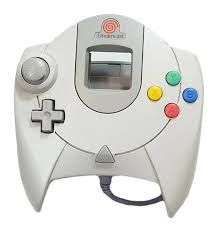
The Dreamcast was ahead of its time for standards. It was the first console to have built in online capabilities with a modem and it featured four controller ports. The large controller had four coloured buttons labelled X, Y, A and B and a memory card slot in it – called the VMU, because it had a screen and its own buttons like a mini console.


The Xbox was also ahead of its time. It had online capability, with built in ethernet out-of-the-box and it also featured four controller ports. The large controller was very similar to the Dreamcast controller design and I did read that it was based on it. It has four colour buttons labelled X, Y, A and B although the colours are swapped around and it has an additional thumb stick. It also features a memory card slot (two in fact) in the controller.

OK, so Microsoft drew inspiration from the Dreamcast when looking at their first home console. But it doesn’t just stop with hardware.

Some Dreamcast titles featured Windows CE on their discs offering more features than just the standard Dreamcast operating system, so Sega already had tie-ins with Microsoft. It was also rumoured that Sega asked Microsoft if they would make the Xbox backward compatible with Dreamcast discs, but they decided not to – wanting their console to be new and fresh, plus worries over online Dreamcast titles.

However, there were a lot of Sega franchises brought over to the original Xbox. 

Crazy Taxi, Jet Set Radio, House Of The Dead and Shenmue all Dreamcast games, received new versions for the Xbox. Panzer Dragoon was a Saturn game which received a new version for the Xbox and PS2.

Outrun from the Master System/Mega Drive and ToeJam & Earl from the Mega Drive both received new titles for the Xbox.

On top of that – although not exclusive to the Xbox – a number of Sonic titles such as Sonic Heroes, Sonic Riders, Shadow The Hedgehog and Sonic Mega Collection Plus made their way to the Xbox.

Sega really wanted to get their games on to other hardware to keep their software side and game franchises afloat even if they didn't have their own home console systems to do it.

With the hardware similarities and the software titles brought to it, the original Xbox could be considered the closest Sega fans got to the mythical Dreamcast 2.


For me, it was a sad day when Sega announced they were closing their hardware side. Despite the Saturn and the Dreamcast being the underdogs I rate them as some of the best consoles ever. This may be why I have such a fascination and love for the original Xbox – a spiritual successor to some of the greatest consoles ever made.

I love my Xbox and still play it today. I'm not a Microsoft fan and do not like the 360 or One, for me the original Xbox is the best offering from Microsoft.

Written by Simon Royal. Follow me at twitter.com/simonroyal

Saturday, 25 July 2020

Upgradeable Laptops... A Thing Of The Past?

Upgradeability seems to be a thing of the past when it comes to modern computers. The obsession with ultra thin ‘everything on the board’ is a problem for technology and the end user. Perhaps that's why I prefer older machines.

Switching from a MacBook Air with zero upgrade options, to a Dell Latitude E5410 laptop recently I was surprised by the upgrade options and the ease of accessibility to do it on this 10 year old laptop.

OK, so the MacBook Air might have been stylish, light and super thin, but that comes at a cost. This Dell Latitude might be chunky, boxy and won't win any beauty awards, but it has bags of upgradeability.


Turn the laptop over and there is an access panel, which is opened via one screw. Open that and you have access to the hard drive, the RAM, the wi-fi PCIe card, the CPU cooling pipe, the CMOS battery and even the system fan. All of which are super easy to take out, clean or replace.

Even on the top of the machine, more complicated repairs are still easier to do than on most hardware. Above the keyboard is a plastic strip where the power button is, it has a small hole which you can easily get a screwdriver or spudger under and pop it off, this gives you access to the screen hinges. While I had it off, I tightened them up, which solved the slight wobble I was seeing.


But the biggest surprise was the keyboard. According to the maintenance manual, undo two screws to release the keyboard and simply pull the tap (which is now visible) above the keyboard and you can just pull it out. I was expecting some kind of ribbon cable attaching it to the motherboard – from my experience these can be tricky to detach and reattach. However, this was different, the keyboard connector is a thick plastic tab that is hidden under the top casing and you just pull out the keyboard. I took mine out and gave it a good clean. Putting the keyboard back was super easy, simple slide it back down, put in the screws and keyboard is replaced.

This is an excellent idea. Imagine spilling something on your keyboard. You can remove that from your machine within seconds, wash it, dry it and put it back. Or worse case, you could just buy another one and put it in.


Add this to the fact the battery is replaceable in seconds by simply pushing a tab and pulling it out, this makes this a fantastic machine for those who like to do things to their computers.

Not only that I like to open up kit and give it a good clean, blow out all that dust and dirt and you can really get in to this machine.

The official service manual has a great strip down guide for most parts – some such as the screen is a bit more complex, but that is to be expected. But everything is far more accessible than anything I have used before and the fact that Dell give you instructions and almost permission to do it is an amazing thing.

I think the only thing that isn't replaceable on this laptop is the CPU.

Companies these days don't want you to be able to upgrade. They want you to replace it with a newer model or send it in to them for an overpriced repair.

But for me, I like the idea of upgradeability and repairability. It's my property, I want to be able to do what I want to it. I want to keep it going for as long as possible.


So hats of to Dell – who I have to admit I haven’t had a good word to say about before I got this laptop – for creating such an easily repairable machine.

Written by Simon Royal. Follow me at twitter.com/simonroyal

Monday, 20 July 2020

Nintendo Wii U… The Forgotten Console

Nintendo may not produce top end consoles, but they always bring a unique style to their games machines which gives them an edge, almost excusing their lack of power compared to competitors in that generation of console.

The original GameBoy might have had a rubbish mono screen, but it gave it an 8 hour battery life, something unheard of in its competitors. The Nintendo DS might not have been the most powerful, but the dual screen and touch capabilities as well as amazing battery life made it different.

The Nintendo Wii, was really just a repackaged GameCube and nowhere near as powerful as the Playstation 3 or Xbox 360, but its motion control made it an excellent family console, aimed at even those who didn’t like gaming.

However, after the mass success of the Wii released in 2006, Nintendo released the Wii U in 2012 – a console often forgotten, sandwiched between the Wii and the Switch – both very popular consoles.

While the Wii sold a whopping 101 million units worldwide, the Wii U sold a measly 13 million units.

But from a console point of view it is a great bit of kit. Rumoured as the Wii HD before its release, the Wii U takes the Wii and adds features it was lacking.


Packing a 1.24Ghz Tri-Core PowerPC processor and 2GB RAM (up from the 729Mhz PowerPC processor and 64MB of RAM of the Wii) and the ability to store its games on Blu-Ray discs, the Wii U was a fairly powerful machine.

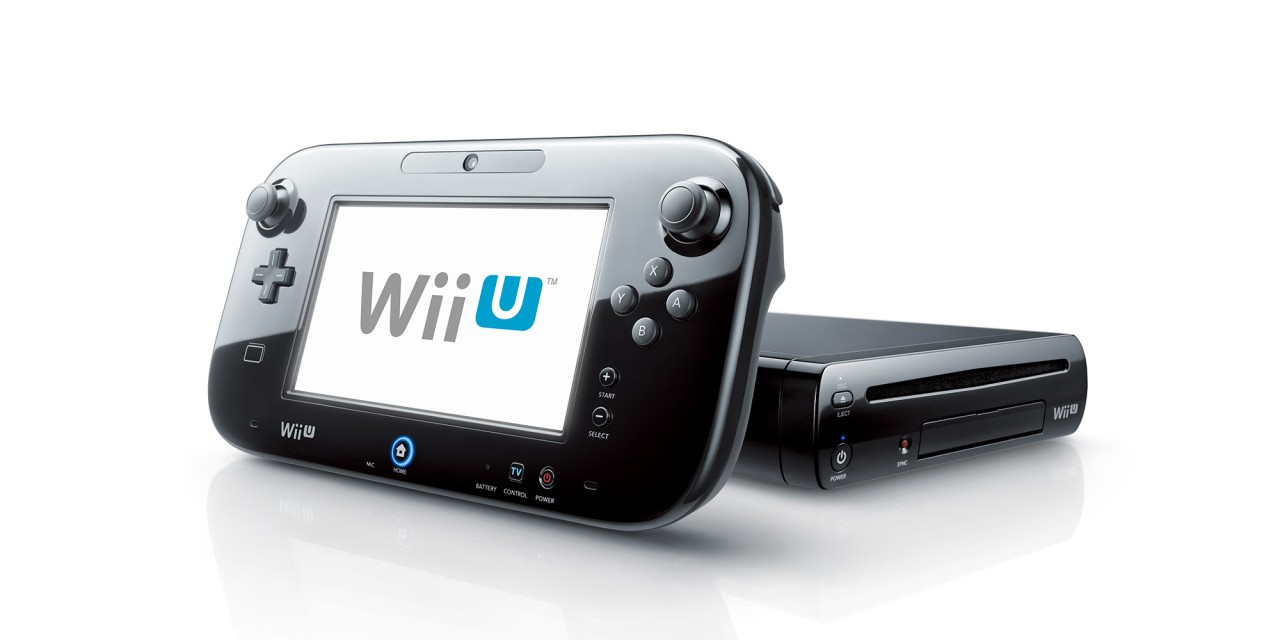
Two versions were released. A white 'basic' version with 8GB internal memory and a black 'premium' version with 32GB internal memory. This might not sound a lot compared to the 100GB+ of its competitors but games run entirely from disc rather than being installed so the internal memory was for save games and downloads only.

The key selling point was the GamePad controller. This oversized controller featured a 6.2” LCD touchscreen as well as the buttons you would find on a regular controller. It meant you could play a lot of games without having your TV on, but it did mean the controller had to be within a close vicinity of your console.

The name suggested a backtrack on the Wii philosophy of being a family console. It was no longer 'we' as in everyone, but 'you' as in a personal console once again.

A massive bonus – and something many still don’t know – is the Wii U is fully backward compatible with the Wii games and all accessories. The Wii U system interface contains a section for the Wii and this then reboots the Wii U into Wii mode.

With the Wii U supporting HDMI (and the Wii not) this means Wii games can still be played on modern TVs.

Wii U games look stunning, aimed at taking advantage of the extra processing power and HD graphics with some main stream games like Call Of Duty Black Ops 2 looking damn near identical to the Playstation 3 version.


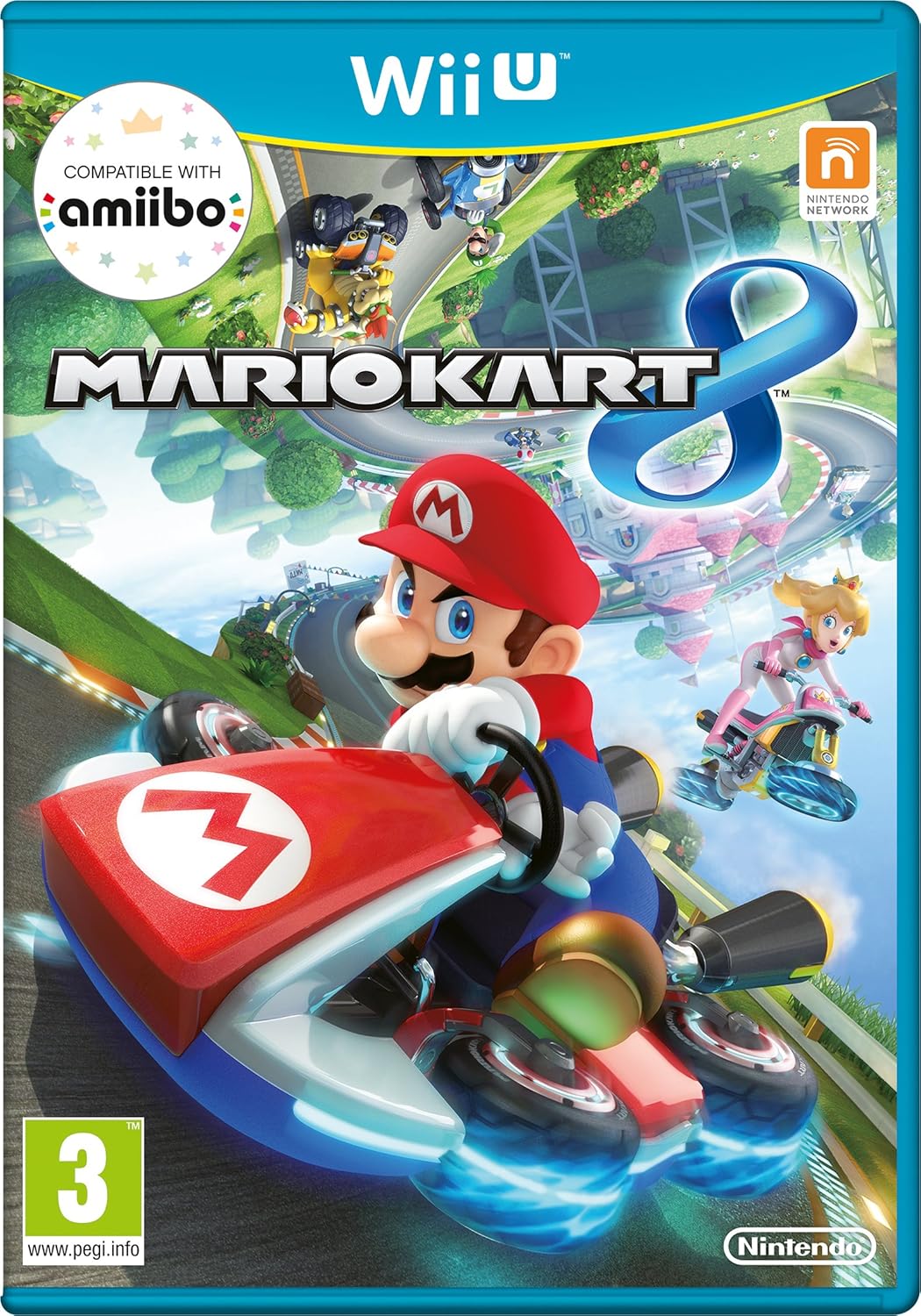
As with all Nintendo consoles it is the first party Mario titles only available on Nintendo hardware that keeps them afloat and why most people buy Nintendo consoles. New Super Mario Bros Wii U, Super Smash Bros U, Mario Kart 8, Super Mario World 3D, The Legend Of Zelda Wind Waker HD, The Legend Of Zelda Breath Of The Wild, Mario Party 10 and Yoshi's Woolly World all make up the best selling titles on the Wii U.

However, the Wii U never really took off. The GamePad was a good idea but the battery life was poor and gamers just didn’t see enough reason to splash a lot of money on an enhanced Wii, when you could pick up Wii consoles for next to nothing.

The lack of sales made a number of companies cut support either entirely or slimmed down such as Electronic Arts, Ubisoft and Bethesda – which obviously impacted sales further, making it one of the lowest selling mainstream consoles ever.

In 2015 the basic version was discontinued and early 2017 saw Nintendo stop production altogether.

I own one. It is for my son and he loves it, and I love the fact I can watch TV or play on my console while he is sitting next to me playing on his Wii U via the GamePad. It also means I can have a cheeky bash on Super Mario Bros Wii U while my wife is watching her stuff on TV.

The Switch owes a lot to the Wii and the Wii U. While the GamePad was tied to the Wii U, it was a forerunner to a portable powerful console such as the Switch and the joy-cons from the Switch are redesigned Wii motion controllers.

So, don’t overlook the Wii U. It is a great console. It is really two consoles in one, with the GamePad being an amazing feature.


Written by Simon Royal. Follow me at twitter.com/simonroyal

Wednesday, 15 July 2020

Goodbye Apple… And Good Riddance

I have finally done it. I have broken free of the Cupertino giant. After 20 years of being an Apple user I am now totally free.

I switched to Linux, bought a Dell laptop and I just sold my MacBook Air. It was a big step but the time was right.

I have left several Apple related groups, stopped being an admin in others and even written my final article for my LowEndMac column 'Tech Spectrum' after 12 years of being an avid contributor.


Tonight I pulled the plug on them altogether and deleted my Apple ID, taking with it any history I have with them and anything I have in my purchase list.

Some bad experiences with Apple and a falling out of love with them over the past few years has spurred my decision to leave them.

I am free. I feel quite relieved. I didn’t even feel nervous about parting with my MacBook Air, just glad it was gone and I was able to move on.

The only reminder I have of my two decades of devotion is the small black Apple logo tattoo on my right arm.

Now its time for a new era.

Written by Simon Royal. Follow me at twitter.com/simonroyal


Tuesday, 14 July 2020

Dell Latitude E5410 Review… Ten Years On

It may seem odd to review a ten year old laptop, but I have recently acquired a Dell Latitude E5410 and want to express my thoughts about it and using it.

Any followers of me on Twitter or readers of this blog will know I have switched from using macOS to using Linux, meaning I ditched my 2012 MacBook Air for a 2010/2011 Dell Latitude E5410.


That may sound an odd move but I needed to step away from Apple kit.

The E5410 is a first gen i5 device at 2.5Ghz. It has 4GB DDR3 RAM (upgradeable up to 8GB) and features a 320GB hard drive and DVDRW drive. The 14” screen features a 1280 x  800 resolution.

The E5 range is basically a plastic version of the E6 which has a mag alloy casing instead. Apart from that the are pretty much identical. That being said this is a 10 year old laptop and it has no cracks or damage (apart from some scratches on the lid), so is a pretty sturdy machine – even the screen hinges are still solid.

It is packed with ports. It has 4x USB 2.0 ports, 1394 port, VGA, PCMCIA, SD slot and ethernet. It also has built in N wireless. This particular model doesn't have bluetooth although there is a light on the casing for it. There are volume buttons above the keyboard. Some of the models have a webcam too, but this one doesn’t – but I never use one so it isn’t a problem.


That's the specs out of the way. How does it fair 10 years on?

In short this thing is a powerful workhorse even today. Mine came with Windows 10 64-bit installed, which I quickly wiped and installed Linux Mint Cinnamon which is also 64-bit.

Installation via USB was very quick, recognising all my hardware out-of-the-box, and adding my apps via Synaptic Package Manager was quick and easy. Once it was set up, I started using it and boy was I surprised. Booting was a little slower than my MacBook Air – but that isn’t surprising as it had an SSD in it – and I have a feeling this is the original hard drive, but once it is booted this machine flies along. Apps open quick and nothing seems to stress it out too much.

I have yet to do anything heavy on it, but for general browsing, video streaming, basic image editing, writing and light apps this thing is great. At some point I will need to do heavier work such as video and audio editing and then we will see how it goes, but an i5 processor (even an early one) and enough RAM should cope with most work – even if it isn’t the quickest.

One thing I was impressed with was the sound out of this machine. It is very loud and clear and the speakers are perfectly situated down either side of the keyboard.

On the subject of the keyboard it was one area I needed to be comfortable with. I do a lot of typing and had gotten used to soft touch chiclet keys, however I am loving the older style keyboard. It is extremely comfortable to type on and even at speed there is no bounce in the keys with just a perfect amount of spring.


The trackpad has quite a small surface area, but it does support multi touch. The mouse buttons are quite close to the front of the laptop which has taken a little while to get used to, but that is just a small niggle.

This might sound like a strange thing to be pleased about but I love activity lights. Something found less and less on modern computers. So I like the fact that the hard drive and wifi lights flash in the top left.

It's a chunky, boxey beast and definitely won't win any beauty awards. Coming from an 11” MacBook Air it sure is noticeable, but it does have the added bonus of built in DVD burning drive, a multitude of ports and an easy access panel on the bottom that allows you to upgrade RAM, hard drive, wifi card and give it a good clean inside.

The battery can be easily replaced - something modern design doesn't allow for much these days. But with the slide of a switch the battery pulls out and can be replaced in seconds. Mine has the standard 6 cell battery - but a 9 cell extended battery is also available. Mine is a genuine Dell battery (although it might not be the original one that came with it) and it still offers nearly two hours of battery life which is very impressive (for a laptop of its age).


From a looks point of view, it looks like it is built with durability rather than style in mind. It has a retro square look to it with clean lines all over it.

I am very impressed. It doesn’t feel like a 10 year old machine when using, but it certainly looks like one.


Written by Simon Royal. Follow me at twitter.com/simonroyal