When Apple announced at WWDC2018 that macOS 10.14 Mojave would have a Dark Mode, my first thought was that in the Linux world, completely dark themes have been around since forever. Anyway, whilst you can make Gnome look almost exactly like Mojave with themes, I have no wish to do that though, or to use Gnome either. KDE has been my desktop of choice for over a year now and it's far less restrictive and more customisable, and has a far better file manager in Dolphin.
I've been using KDE Neon for about awhile now, having previously used Debian Testing before that. It's currently based on Ubuntu 16.04 but with the latest KDE software, so it's more up to date than Kubuntu 16.04 and still has a newer version of KDE than Kubuntu 18.04. The image below is how my desktop looks right now. I think I found the wallpapers on this subreddit but then I found out they are from iOS or macOS, but they work well on OLED/LED/AMOLED screens. And yes I do have an odd arrangement of a 27" landscape orientated monitor and a 22" portrait orientated monitor, which makes screenshots look quite odd too. Sadly I had to swap my right hand monitor for a non-LED monitor as the old one died. I take donations... ;)
I use Breeze Dark desktop theme which you can find in the Theme settings, and my choice of icons is Papirus Dark. Breeze Dark icons work well too. You can start typing what you need in the K Menu to quickly find anything. For a macOS-like dock, I use Latte dock, which is highly configurable and is far less buggy than Cairo Dock.
For Google Chrome, I found a good dark theme that goes well with the desktop theme, appropriately named Dark Theme V3. To make every website in Chrome dark, I found a good dark mode extension in the Chrome web store called Dark Reader. I found it recently and was the first one I found that doesn't mess up how Google Photos and some other app-like sites work. My only slight issue I've had with it is I cannot see the cursor input in YouTube comment boxes. The good thing is all my Chrome settings are synced to my other Chrome installs so I have these on my Chromebook too, which is nice. It's particularly good with Facebook and Google Plus which are far too bright normally.
And that's pretty much it. It certainly is easier on my eyes than without all the dark themes, particularly as I use my computer in a mostly dark room. Let me know in the comments about your dark themes and desktop tweaks.
Showing posts with label ubuntu. Show all posts
Saturday, 8 September 2018
Tuesday, 11 April 2017
6 Reasons Why I Use Linux
I often get asked on Google Plus or elsewhere "why do you use Linux?" so I thought I would explain my answer here in detail for the next time someone asks me. But first a little background history on my Linux story. I found out about Linux in around 2004 when I picked up some Linux magazines in a charity shop for 10 Pence each while I was on a web design course at college. I was tired of reinstalling Windows XP every 4 months or so I downloaded a few distros, settling on Mepis for a while on my 733Mhz Pentium 3. I went through distro hopping covering Suse, Vectorlinux, Debian etc and settled for a longer time on Xubuntu when I found that it was the first distro I tried that worked with the Ralink wireless drivers on my Toshiba Tecra laptop.
I have mostly used Ubuntu and variants of it since then, on various hardware, upgrading each time, and I am currently using Ubuntu LTS-based version of KDE Neon, which has been the best KDE experience I have ever had. I still check out other distros in Virtualbox occasionally. I also still use (and tolerate) Windows 10 for GTA V and OSX for music production. OK now down to the reasons, I am sure other people might have different reasons for using Linux, but these, in no particular order, are mine:
1. Freedom.
One of the best things about Linux is that it is free to use as much as you want, none of that restrictive one copy per machine nonsense or Activation hassle you get with Windows. nor is it restricted to one make of computer or set of hardware like OSX. And of course most distros are also free to use as well. I can, and have, moved Linux installs from one machine to another without any problems many times. Installs can often out last the machines they are running on.
2. The sheer number of (mostly free) applications available
When you install most Linux distros you not only get an OS you usually get some common apps to do general stuff too, and access to thousands of applications available in the repositories just a few clicks away in your package manager of choice! I am kind of surprised there isn't something like the DVD/CD burning app K3B by default in Windows or OSX for example. Although a lot of major games are not available yet, I am sure with time they will be, thanks to Steam on Linux. Literally the only reason I use Windows a little is for GTA V.
3. Reliability and resilience
Linux is so resilient, it doesn't slowdown over time, rarely crashes and when it does I can find out why and report bugs and get a response usually. I find I can rescue it easier than Windows, and I am dreading reinstalling Windows again since it takes so long to get everything installed again. At least with Linux I can use it while I install and configure it.
4. Security and control
With Linux I feel I have full control over what it does and the security of the system, both of the OS/apps and over my data. I really don't trust Windows 10 with my data. I've also never had to remove viruses or malware from a Linux machine.
5. Making use of old or obsolete hardware
Another reason I love Linux is that old Dell and HP workstations and business laptops with no longer useful Windows licences (e.g. Vista Business or XP licences) are cheap to buy - no one wants to buy a Windows 7/8.1/10 licence for them - but they run Linux very well, many of them were certified for Linux when they were new which helps. I have also installed Linux for friends on cheap underpowered hardware that performed poorly with Windows even when they were new.
6. Customizability and Flexibility
I can make Linux work and look how I want, using as many or as few resources as I want. For lower end PCs, I use Xubuntu or Lubuntu or even Debian with lightweight desktop environments. For my main desktops that have plenty of resources I prefer KDE, specifically KDE Neon. My main laptop is a Chromebook and my phone runs Android too, both are Linux based. Also Live Linux distros on a USB stick or DVDs are very useful too for rescuing data or removing viruses from Windows PCs etc.
This is not an exhaustive list but I hope this answers the question of why I use Linux satisfactorily.
I have mostly used Ubuntu and variants of it since then, on various hardware, upgrading each time, and I am currently using Ubuntu LTS-based version of KDE Neon, which has been the best KDE experience I have ever had. I still check out other distros in Virtualbox occasionally. I also still use (and tolerate) Windows 10 for GTA V and OSX for music production. OK now down to the reasons, I am sure other people might have different reasons for using Linux, but these, in no particular order, are mine:
1. Freedom.
One of the best things about Linux is that it is free to use as much as you want, none of that restrictive one copy per machine nonsense or Activation hassle you get with Windows. nor is it restricted to one make of computer or set of hardware like OSX. And of course most distros are also free to use as well. I can, and have, moved Linux installs from one machine to another without any problems many times. Installs can often out last the machines they are running on.
2. The sheer number of (mostly free) applications available
When you install most Linux distros you not only get an OS you usually get some common apps to do general stuff too, and access to thousands of applications available in the repositories just a few clicks away in your package manager of choice! I am kind of surprised there isn't something like the DVD/CD burning app K3B by default in Windows or OSX for example. Although a lot of major games are not available yet, I am sure with time they will be, thanks to Steam on Linux. Literally the only reason I use Windows a little is for GTA V.
3. Reliability and resilience
Linux is so resilient, it doesn't slowdown over time, rarely crashes and when it does I can find out why and report bugs and get a response usually. I find I can rescue it easier than Windows, and I am dreading reinstalling Windows again since it takes so long to get everything installed again. At least with Linux I can use it while I install and configure it.
4. Security and control
With Linux I feel I have full control over what it does and the security of the system, both of the OS/apps and over my data. I really don't trust Windows 10 with my data. I've also never had to remove viruses or malware from a Linux machine.
5. Making use of old or obsolete hardware
Another reason I love Linux is that old Dell and HP workstations and business laptops with no longer useful Windows licences (e.g. Vista Business or XP licences) are cheap to buy - no one wants to buy a Windows 7/8.1/10 licence for them - but they run Linux very well, many of them were certified for Linux when they were new which helps. I have also installed Linux for friends on cheap underpowered hardware that performed poorly with Windows even when they were new.
6. Customizability and Flexibility
I can make Linux work and look how I want, using as many or as few resources as I want. For lower end PCs, I use Xubuntu or Lubuntu or even Debian with lightweight desktop environments. For my main desktops that have plenty of resources I prefer KDE, specifically KDE Neon. My main laptop is a Chromebook and my phone runs Android too, both are Linux based. Also Live Linux distros on a USB stick or DVDs are very useful too for rescuing data or removing viruses from Windows PCs etc.
This is not an exhaustive list but I hope this answers the question of why I use Linux satisfactorily.
Wednesday, 6 January 2016
Peppermint Linux on a Samsung N145 Netbook
I have not really used Samsung N145 netbook in ages since I got my HP Chromebook 14 but I was playing around with Cloudready and couldn't get it to install. Since I had already wiped Xubuntu I decided to try something else. A friend of mine reminded me that Peppermint Linux is still around, and I had not tried that in ages either, so I thought I would give it a go. Peppermint is a heavily customised version of Ubuntu/Mint Linux and LXDE desktop with a smart dark default theme and nemo file manager. Install is in the same sort of way as most Ubuntu-based installers and I had it installed without a hitch. On using it installed for the first time it does feel quicker than Xubuntu and now the screen brightness keyboard shortcuts actually work!
Peppermint comes with a minimal set of locally installed apps - just the basics - Chromium browser (with DuckDuckGo search as per Mint), VLC media player and nemo for file management. It has the same update system as Mint. Peppermint also have added some web app tech to "... put web applications on an equal footing with locally installed apps by allowing them easy integration into system menus, and delivery to the desktop via SSB's so they mimic locally installed applications." I have installed Chrome, Firefox, Gmusicbrowser, Guake and Filezilla so far and moved the main panel to the top where I prefer it. It feels lighter than Xubuntu and much more polished than LXLE, I'd definitely recommend this distro as a possible Windows replacement for old netbooks like this one and for other low end PCs.
![]() |
| Peppermint default desktop showing the screen brightness shortcuts working! |
Peppermint comes with a minimal set of locally installed apps - just the basics - Chromium browser (with DuckDuckGo search as per Mint), VLC media player and nemo for file management. It has the same update system as Mint. Peppermint also have added some web app tech to "... put web applications on an equal footing with locally installed apps by allowing them easy integration into system menus, and delivery to the desktop via SSB's so they mimic locally installed applications." I have installed Chrome, Firefox, Gmusicbrowser, Guake and Filezilla so far and moved the main panel to the top where I prefer it. It feels lighter than Xubuntu and much more polished than LXLE, I'd definitely recommend this distro as a possible Windows replacement for old netbooks like this one and for other low end PCs.
Labels:
chrome,
customization,
laptops,
linux,
linux mint,
lubuntu,
lxle,
Mint,
netbook,
peppermint linux,
ubuntu,
xubuntu
Sunday, 24 May 2015
Kubuntu 15.04 on a Dell Latitude D520
The only minor complaint I have is the wallpaper downloader still does not find any wallpapers, complaining of a network error, despite the network being very much alive. I ended up downloading one of my own photos and manually setting that as my wallpaper.
Also, the Plasma desktop did crash once or twice and I had to kill Xorg and restart KDE...
Muon is KDE's default software manager these days, but I'm not really that keen on it, and I often use the command line or Synaptic. It's purely personal taste. I installed kubuntu-restricted-extras and VLC as per usual for the extra codecs and VLC's advanced features. I also installed Filezilla and downloaded and installed Chrome.
All Ubuntu derivatives have a Restricted Driver Manager for proprietary drivers, on this Latitude D520 there's one for the Intel CPU microcode firmware.
Overall performance wise it is not too bad on this machine, definitely feels quicker than KDE 4 did on Kubuntu 14.04. However, this low end machine is not really quick enough for KDE and Chrome even with 3GB RAM! Probably best to use Firefox instead if you can or install a lighter weight derivative such as Xubuntu that uses the lighter weight XFCE desktop. KDE Plasma 5 though is shaping up to be a great desktop. I shall try other distros with it, to see if they have less bugs than Kubuntu does and hopefully it should be well polished by the time the next long term release of Mint comes along since that is what I run my main workstation on.
Saturday, 30 August 2014
Revitalizing a Sony VAIO with Xubuntu 14.04 (Part 2)
Back in June of this year, I rescued a 2008 Sony VAIO VGN-N31S/W from a fate worse than being recycled, a life with Windows Vista. It had a dodgy power cable, dead battery and a missing letter 'O' on the keyboard. I have bought a new PSU, upgraded the RAM from 1GB to 3GB and have just replaced the missing key.
When I first got the VAIO, I replaced the broken Windows Vista installation with Xubuntu 14.04 32bit, but I now wish I had installed the 64bit version. I wanted to reinstall but could not get it to boot from USB or DVD, which is odd because I managed it before. And I check every time that the boot settings are correct in the BIOS. I would also like to replace the dead battery but I am wary about spending more money it. I have recently switched from the Xubuntu desktop to Cinnamon desktop using the PPA and the how-to detailed in this article and it runs very well on the VAIO with it's 3GB RAM.
Having used the VAIO for about 2 months now I now know it's strengths and weaknesses and faults. Although it weighs 6.6lbs, it does not feel heavy when sat on my lap, but it does feel back-breaking when carrying it in my rucksack! I am not usually a fan of glossy screens but I love the VAIO's beautiful 15.4" screen that gives a 1280 x 800 (16:10) resolution. My family always remark how good it looks when I am showing them photos on it. I can also store plenty of photos on the 320GB hard drive, which is handy when away from the Internet. It also suspends and resumes perfectly and is very quiet in use, it's cooling fans can barely be heard. It's also the only laptop I have with an Express card slot.
On the downside, the keyboard is not as comfortable as most of my other laptops. I don't know whether this is because of age or dirt or it was built that way. I often find i get more typos than I do with my other laptops. The trackpad buttons aren't very responsive either, you have to hit them in just the right place for response. the trackpad itself is just fine though. It also would be nice if Sony had put Gigabit onboard rather than just 10/100 Ethernet.
Overall it does feel more of a consumer grade laptop than a corporate one, but I am fairly happy with the Sony VAIO, especially considering it has not cost me much to obtain and repair so for now I shall keep it running until it dies. I find it very useful for showing photos and videos to my folks, mainly because of that fantastic screen. I used to use my Samsung N145 netbook for this but the screen is tiny and not very bright, so despite it's weight, the power and screen of the VAIO makes it better suited to the job.
When I first got the VAIO, I replaced the broken Windows Vista installation with Xubuntu 14.04 32bit, but I now wish I had installed the 64bit version. I wanted to reinstall but could not get it to boot from USB or DVD, which is odd because I managed it before. And I check every time that the boot settings are correct in the BIOS. I would also like to replace the dead battery but I am wary about spending more money it. I have recently switched from the Xubuntu desktop to Cinnamon desktop using the PPA and the how-to detailed in this article and it runs very well on the VAIO with it's 3GB RAM.
Having used the VAIO for about 2 months now I now know it's strengths and weaknesses and faults. Although it weighs 6.6lbs, it does not feel heavy when sat on my lap, but it does feel back-breaking when carrying it in my rucksack! I am not usually a fan of glossy screens but I love the VAIO's beautiful 15.4" screen that gives a 1280 x 800 (16:10) resolution. My family always remark how good it looks when I am showing them photos on it. I can also store plenty of photos on the 320GB hard drive, which is handy when away from the Internet. It also suspends and resumes perfectly and is very quiet in use, it's cooling fans can barely be heard. It's also the only laptop I have with an Express card slot.
On the downside, the keyboard is not as comfortable as most of my other laptops. I don't know whether this is because of age or dirt or it was built that way. I often find i get more typos than I do with my other laptops. The trackpad buttons aren't very responsive either, you have to hit them in just the right place for response. the trackpad itself is just fine though. It also would be nice if Sony had put Gigabit onboard rather than just 10/100 Ethernet.
Overall it does feel more of a consumer grade laptop than a corporate one, but I am fairly happy with the Sony VAIO, especially considering it has not cost me much to obtain and repair so for now I shall keep it running until it dies. I find it very useful for showing photos and videos to my folks, mainly because of that fantastic screen. I used to use my Samsung N145 netbook for this but the screen is tiny and not very bright, so despite it's weight, the power and screen of the VAIO makes it better suited to the job.
Labels:
cinnamon desktop,
laptops,
linux,
ubuntu,
VAIO,
VGN-N31S,
windows,
windows vista,
xubuntu
Friday, 20 June 2014
Living With KDE on Kubuntu 14.04 - part 2.
Some observations I have made while using Kubuntu 14.04. Part 1 is here.
Printing
For some reason, my networked HP Laserjet 2600n printer installs without me having to choose the driver in Xubuntu and Mint Cinnamon, but not in Kubuntu, where the driver appears to be missing. I solved this problem by installing hplip-gui (the graphical tool for HP Lip) which downloads and installs the correct driver.
Copy and Dropbox cloud storage
The Copy app started OK but the interface is quite sluggish and at one point got confused when I set it to only download certain files on this machine, it then went on to download the whole lot, greater than the size of the HDD on this laptop, not a good idea! Deleting the Copy folder and Copy itself and running it again seemed to fix it.
Dropbox works OK apart from it does not integrate into Dolphin, the KDE file manager, so there's nothing to show what's happening in the file manger.
KDE IM Contacts
This is KDE's default IM client, also known as Telepathy, it works OK but I find it annoying that KDE Wallet always asks me for my password, and it's the only app so far that does this. I remember having this problem on KDE3 but only when I had autologin enabled, if I recall correctly. Also I am really not keen on that Indicator/tray icon!
Gwenview
One thing that I am quite impressed with is the progress of Gwenview image viewer. I have not used it for years, probably since KDE3, and I have to say it has become a very decent photo viewer, good for quick crops and other edits, better than Gnome's default viewer.
KDE Connect
Usually I use either LinConnect or PushBullet to show notifications from my Galaxy S3 (which runs CM11) on my desktop, but KDE has KDE Connect which is easy to install from the default repositories, just install the kdeconnect package. It has a nice configuration tool too, found in KDE's System Settings and was very easy to setup. It does seem to be more reliable (and easier to setup) than LinConnect and it does not need a browser like PushBullet.
Amarok
I used to love Amarok back in the KDE 3 days, then it went through an overhaul and took ages for it's third party add-ons to catch-up, and I really wasn't keen on the versions I tried a year or so ago. However in Kubuntu 14.04 it does seem to have improved a lot, it runs quite smoothly on my low end laptop. Having said that, I have not tested it elsewhere with my large collection of mp3s. Unlike a lot of other players that work fine in many different desktops, Amarok works best in it's native KDE.
I am surprised how much I have got used to Kubuntu, and it is a reasonably usable desktop, apart from the time it takes to get it setup how I want it, and a few little niggles. I shall keep it on this laptop for now, but I don't think I'll use it on my main desktop yet, unless Cinnamon becomes completely unusable.
Printing
For some reason, my networked HP Laserjet 2600n printer installs without me having to choose the driver in Xubuntu and Mint Cinnamon, but not in Kubuntu, where the driver appears to be missing. I solved this problem by installing hplip-gui (the graphical tool for HP Lip) which downloads and installs the correct driver.
![]() |
| The correct driver missing by default |
![]() |
| HP Lip Gui |
Copy and Dropbox cloud storage
The Copy app started OK but the interface is quite sluggish and at one point got confused when I set it to only download certain files on this machine, it then went on to download the whole lot, greater than the size of the HDD on this laptop, not a good idea! Deleting the Copy folder and Copy itself and running it again seemed to fix it.
Dropbox works OK apart from it does not integrate into Dolphin, the KDE file manager, so there's nothing to show what's happening in the file manger.
KDE IM Contacts
This is KDE's default IM client, also known as Telepathy, it works OK but I find it annoying that KDE Wallet always asks me for my password, and it's the only app so far that does this. I remember having this problem on KDE3 but only when I had autologin enabled, if I recall correctly. Also I am really not keen on that Indicator/tray icon!
Gwenview
One thing that I am quite impressed with is the progress of Gwenview image viewer. I have not used it for years, probably since KDE3, and I have to say it has become a very decent photo viewer, good for quick crops and other edits, better than Gnome's default viewer.
KDE Connect
Usually I use either LinConnect or PushBullet to show notifications from my Galaxy S3 (which runs CM11) on my desktop, but KDE has KDE Connect which is easy to install from the default repositories, just install the kdeconnect package. It has a nice configuration tool too, found in KDE's System Settings and was very easy to setup. It does seem to be more reliable (and easier to setup) than LinConnect and it does not need a browser like PushBullet.
Amarok
I used to love Amarok back in the KDE 3 days, then it went through an overhaul and took ages for it's third party add-ons to catch-up, and I really wasn't keen on the versions I tried a year or so ago. However in Kubuntu 14.04 it does seem to have improved a lot, it runs quite smoothly on my low end laptop. Having said that, I have not tested it elsewhere with my large collection of mp3s. Unlike a lot of other players that work fine in many different desktops, Amarok works best in it's native KDE.
I am surprised how much I have got used to Kubuntu, and it is a reasonably usable desktop, apart from the time it takes to get it setup how I want it, and a few little niggles. I shall keep it on this laptop for now, but I don't think I'll use it on my main desktop yet, unless Cinnamon becomes completely unusable.
Wednesday, 18 June 2014
Living With KDE on Kubuntu 14.04
First a little background. Most of the first Linux distros I ever used had a KDE 3 desktop or had it as an option, and I preferred it to Gnome 2 at the time, regularly used Mepis, Vector, Fedora, Slax amongst others. I was a regular distro hopper back then, but I stuck with KDE 3 until just before KDE 4.x then I switched to Gnome 2 on Ubuntu 7.10 (on my desktop) and XFCE on Xubuntu (on my laptop). Late KDE 3 got a bit buggy for me and once i started using Gnome 2 regularly, I started to prefer it, and I used it right up until Ubuntu switched to using Unity by default. I did briefly try Gnome Classic but it was never the same, so I switched to Xubuntu on desktops and laptops, and then recently Mint Cinnamon (desktop and 2 laptops) and Xubuntu (lower end laptops).
So I have not really thoroughly tried Kubuntu or any KDE desktop for a while and every time I did I found it a little annoying to use, and the default themes distros generally use do not help either, especially Kubuntu. Even the default KDE theme on Fedora isn't very nice and besides I always end up going back to *buntu or Debian based distros as that is what I am used to and know how to use and tweak. Just recently though, since 14.04 came out, I decided to try using Kubuntu on one of my laptops and really try to use it every day, to see if I could get it the way I want it. Here's how Kubuntu looks by default:
First thing I had to do, was change that hideous default look somehow and remove that shiny folder thing! KDE has lots of settings to customize the entire desktop environment. At first KDE was also quite sluggish on this Dell Latitude D520 which has a 1.6ghz Core Duo CPU integrated Intel graphics and 4GB of RAM. It ran much better once I had disabled all the snazzy desktop effects. This actually makes KDE more bearable for me as I cannot stand the horrible shiny bling and great big drop shadows under windows, always reminds me of Ja Ja Binks in the Robot Chicken Star Wars special, by default KDE is all "Me-sa all sparkly glowy!" - and equally annoying!
I tried various themes and icons and finally settled on Moka icon theme, Chrome Dark window decorations, and Opaquity Desktop theme. I also set the Splash Screen to Minimalistic and also set the desktop wallpaper and Login screen to the same image. I've also tweaked the colours too.
Layout-wise, I have moved the main panel to the top, made it smaller to give me more desktop space, and I think it also looks much nicer. Instead of a lower panel I always like to have a dock. My favourite is Cairo Dock but it merely crashed out in KDE on this laptop, so I installed Plank (aka Docky) instead and gave it permanent shortcuts for all my most used apps. I found this little list of stuff to do after installing Kubuntu quite handy. I stuck with Firefox as my default browser, though I might install Chrome too at some point. I also installed Yakuake drop-down Quake-style terminal, similar to Guake that I usually use.
One thing that I found a little annoying is KDE uses an "Activities" thing that I don't really like, and I found it took a bit of digging to work out how to add another workspace and set the default shortcuts for switching between them using Ctrl + Alt + left/right cursor, which is default in pretty much every major DE I have used.
KDE is pretty much a tinkerers paradise and although I used to enjoy that part, these days I prefer to actually use my desktop after no more than 30 minutes or so of configuration. I have spent a lot more time than that just trying to get KDE to look and work how I like it. With my main desktop I use Mint Cinnamon and all I usually do, appearance-wise, on that is move the panel, install Cairo Dock and change the icons, that's all I need to do. KDE needs a lot more tinkering to get it how I want it. Here's how my KDE desktop now looks after I login, as you can see I like a nice clean desktop with no icons or clutter, just a panel and dock. I shall keep using Kubuntu on this laptop for awhile and see how things go.
So I have not really thoroughly tried Kubuntu or any KDE desktop for a while and every time I did I found it a little annoying to use, and the default themes distros generally use do not help either, especially Kubuntu. Even the default KDE theme on Fedora isn't very nice and besides I always end up going back to *buntu or Debian based distros as that is what I am used to and know how to use and tweak. Just recently though, since 14.04 came out, I decided to try using Kubuntu on one of my laptops and really try to use it every day, to see if I could get it the way I want it. Here's how Kubuntu looks by default:
First thing I had to do, was change that hideous default look somehow and remove that shiny folder thing! KDE has lots of settings to customize the entire desktop environment. At first KDE was also quite sluggish on this Dell Latitude D520 which has a 1.6ghz Core Duo CPU integrated Intel graphics and 4GB of RAM. It ran much better once I had disabled all the snazzy desktop effects. This actually makes KDE more bearable for me as I cannot stand the horrible shiny bling and great big drop shadows under windows, always reminds me of Ja Ja Binks in the Robot Chicken Star Wars special, by default KDE is all "Me-sa all sparkly glowy!" - and equally annoying!
![]() |
| Me-sa all sparkly glowy! |
I tried various themes and icons and finally settled on Moka icon theme, Chrome Dark window decorations, and Opaquity Desktop theme. I also set the Splash Screen to Minimalistic and also set the desktop wallpaper and Login screen to the same image. I've also tweaked the colours too.
Layout-wise, I have moved the main panel to the top, made it smaller to give me more desktop space, and I think it also looks much nicer. Instead of a lower panel I always like to have a dock. My favourite is Cairo Dock but it merely crashed out in KDE on this laptop, so I installed Plank (aka Docky) instead and gave it permanent shortcuts for all my most used apps. I found this little list of stuff to do after installing Kubuntu quite handy. I stuck with Firefox as my default browser, though I might install Chrome too at some point. I also installed Yakuake drop-down Quake-style terminal, similar to Guake that I usually use.
One thing that I found a little annoying is KDE uses an "Activities" thing that I don't really like, and I found it took a bit of digging to work out how to add another workspace and set the default shortcuts for switching between them using Ctrl + Alt + left/right cursor, which is default in pretty much every major DE I have used.
KDE is pretty much a tinkerers paradise and although I used to enjoy that part, these days I prefer to actually use my desktop after no more than 30 minutes or so of configuration. I have spent a lot more time than that just trying to get KDE to look and work how I like it. With my main desktop I use Mint Cinnamon and all I usually do, appearance-wise, on that is move the panel, install Cairo Dock and change the icons, that's all I need to do. KDE needs a lot more tinkering to get it how I want it. Here's how my KDE desktop now looks after I login, as you can see I like a nice clean desktop with no icons or clutter, just a panel and dock. I shall keep using Kubuntu on this laptop for awhile and see how things go.
Monday, 21 April 2014
LXLE on a Dell Latitude D430
Until a few days ago, my Dell Latitude D430 was running Elementary OS, but I was getting frustrated at it's layout and decided to have a change of distro. A friend of mine recommended a distro called LXLE. It's a lightweight distro always based off the LTS release of Lubuntu, the LXDE desktop flavour of Ubuntu. It has various PPAs added and extra software, (useful codecs, applets etc) added. I've tried Lubuntu before but I didn't really like it for some reason. However, upon trying LXLE as a virtual machine in Virtualbox, I found LXLE to have a much better out-of-the-box experience than Lubuntu, so I decided it would be ideal for my D430.
LXLE feels more more consistent and overall neater than Lubuntu. Also Firefox is the default browser rather than Chromium. My only real criticism is I can't seem to find the shortcuts for switching desktops, which is usually Ctrl + Alt + Cursor keys for Lubuntu. I also think there are too many little games installed by default though that's only a minor point. Oh and there's no battery applet installed by default. Out the box, there's a panel at the bottom like Windows and a dock-style panel on the left that is set to auto-hide. I have changed the layout slightly, moving the lower panel to the top and the side one to the bottom, (keeping the lower panel in auto-hide mode). I have also installed Guake terminal and Dropbox.
LXLE has lots of tweaks and add-ons by default than Lubuntu like Aero Snap, Quick Launch, and there are "Four familiar desktop layout paradigms" though I stick with the XP paradigm, these can be chosen at the login screen under Sessions. The desktop system monitor and weather applet are neat touches too.
My Dell Latitude D430 has a 1.33Ghz Core 2 Duo CPU with 2GB of RAM which is the maximum supported, which I have found previously to struggle with "full fat" desktop OS and lots of browser tabs open, but it really flies on LXLE! Much like all *buntu flavours, it uses the same familiar installer and all the hardware works out the box. It feels even faster than Xubuntu 12.04 and Elementary OS, and I shall keep LXLE on it for now, I'd definitely recommend it for low end laptops and desktops and ideal to replace the recently unsupported Windows XP.
Saturday, 19 April 2014
Upgrading from Xubuntu 12.04 to 14.04
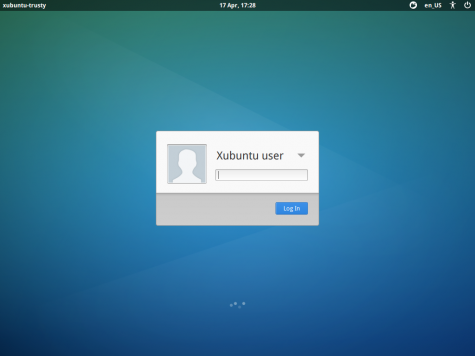
The upgrade went very smoothly, mainly because I only have a couple of PPAs added, most of the other software is from the default repos. The main new features I noticed were the much better looking login/lock screen (Light Locker), prettier boot screen and the new Whisker Menu which replaces the old menu. Note if you have upgraded from 12.04 you will have to replace the old menu yourself by removing the old one from the panel and adding the new one. Sean Davis has already done a nice rundown of the new features in 14.04. Overall it seems to be worth the upgrade, a good solid release.
Thursday, 23 January 2014
Thoughts On Convergence and Why Google and Apple Got It Right and Microsoft Got It Wrong
In a brief interview with Macworld to mark the 30th anniversary of the Mac, Apple's executive Phil Schiller (and his cohort Craig Federighi, I keep misreading his name as Ferengi...) affirmed that the Mac still has a bright future "as far as our eye can see." Federighi went on to say “It’s obvious and easy
enough to slap a touchscreen on a piece of hardware, but is that a good
experience? We believe, no.” Obviously the Mac will stick around as it would hardly be practical to write iOS apps (or lots of other heavy desktop work) on an iOS device.
Now I may not be a massive fan of Apple and I particularly get riled up when it comes to their attitude to patents, but as far as the desktop computer is concerned, Apple have got one thing right. Despite the massive success of the iPhone and iPad, they have kept OSX and iOS seperate, with just a little convergence between the two. There is Dashboard, iMessage, trackpad gestures and the admittedly silly "Natural Scrolling" but that's about it. OSX is still a reasonably usable desktop OS, albeit a fixed, non-customizable one.
Microsoft on the other hand, have, in my opinion, got things very wrong! They basically shovelled the Metro (I refuse to call it "Modern") interface onto phone, tablet and, most annoyingly, desktop with Windows 8. Microsoft has confused and annoyed a lot of users with this abomination. Even 8.1 does not really fix things, it merely brings back the Start button rather than what a lot of desktop users actually want which is the Start menu. Windows 9 will supposedly fix things by putting Metro apps in a windowed app on the desktop but we shall see. By then though it may be too late and Windows will be irrelevant, perhaps it already is...
Google have ChromeOS and Android. They have, at least on their own devices, kept them separate. ChromeOS is aimed at laptops and desktops as the browser is the desktop to Google. Chromebooks are great for those who need a second machine for writing, browsing and other light work. Despite Microsoft's FUD, Chromebooks are actually useful offline too. Things have taken a slightly different approach recently with some OEMs like Lenovo and HP putting Android onto all-in-one desktops and laptops, presumably to take advantage of the huge amount of apps in the Play store. I am not quite sure how I feel about this yet, I have yet to see what they are like in the flesh. If, and that's a big if, they have skinned Android to make it more desktop-like, they might be onto something but I don't think Android is quite right in it's stock form for a desktop PC, at least as a work computer, though it would be great as a touchscreen jukebox or media centre.
For things like photo and video editing, music production though I would rather have a full OS such as a 'proper' Linux distro, my personal preference at the moment being Linux Mint with Cinnamon desktop. With Linux, and pretty much any desktop, I like a top panel with the usual indicators, a searchable menu on the left and a dock at the base of the screen on one monitor, the great thing about Linux is it is so customizable!
Again I am not really keen on Ubuntu's Unity or Gnome Shell as I think it gets in the way of what I want to do, I don't like massive fullscreen menus covering almost a whole screen, which is one reason I hate Metro on Windows 8. And one day Ubuntu Touch might work well on phones and tablets but I just cannot get on with it on the desktop and I really have tried to like it. One thing I would (or would have liked) from Canonical is Ubuntu for Android, it would be great to take my phone, dock it to a HDMI monitor, Bluetooth keyboard and mouse and have Ubuntu instantly load up on the monitor and still be able to use Android apps in a window on the desktop. This would be cool for travelling light for cubicle people.
I love having a (reasonably) powerful, multi-monitor desktop for AV stuff, Steam games etc, then switching over to a laptop for late night blogging and browsing. My Nexus 7 is great for light browsing and casual gaming and my Galaxy S3 is my camera, on-the-go browser, info-finder and above all, phone! Firefox syncs browser history and tabs between all three devices and my files are never far away with Dropbox or Copy or Linux home server on the LAN.
I have also been using PushBullet to receive Android Notifications on the desktop from phone and tablet. It's also good for quickly sending links between devices. It works OK but I wish there was a proper, fully formed desktop app on Linux that would do it better. Something like KDE Connect, but not so tied to KDE, would be great. Overall, I like having different devices and form factors for different purposes but with some synchronicity between them.
Now I may not be a massive fan of Apple and I particularly get riled up when it comes to their attitude to patents, but as far as the desktop computer is concerned, Apple have got one thing right. Despite the massive success of the iPhone and iPad, they have kept OSX and iOS seperate, with just a little convergence between the two. There is Dashboard, iMessage, trackpad gestures and the admittedly silly "Natural Scrolling" but that's about it. OSX is still a reasonably usable desktop OS, albeit a fixed, non-customizable one.
Microsoft on the other hand, have, in my opinion, got things very wrong! They basically shovelled the Metro (I refuse to call it "Modern") interface onto phone, tablet and, most annoyingly, desktop with Windows 8. Microsoft has confused and annoyed a lot of users with this abomination. Even 8.1 does not really fix things, it merely brings back the Start button rather than what a lot of desktop users actually want which is the Start menu. Windows 9 will supposedly fix things by putting Metro apps in a windowed app on the desktop but we shall see. By then though it may be too late and Windows will be irrelevant, perhaps it already is...
Google have ChromeOS and Android. They have, at least on their own devices, kept them separate. ChromeOS is aimed at laptops and desktops as the browser is the desktop to Google. Chromebooks are great for those who need a second machine for writing, browsing and other light work. Despite Microsoft's FUD, Chromebooks are actually useful offline too. Things have taken a slightly different approach recently with some OEMs like Lenovo and HP putting Android onto all-in-one desktops and laptops, presumably to take advantage of the huge amount of apps in the Play store. I am not quite sure how I feel about this yet, I have yet to see what they are like in the flesh. If, and that's a big if, they have skinned Android to make it more desktop-like, they might be onto something but I don't think Android is quite right in it's stock form for a desktop PC, at least as a work computer, though it would be great as a touchscreen jukebox or media centre.
For things like photo and video editing, music production though I would rather have a full OS such as a 'proper' Linux distro, my personal preference at the moment being Linux Mint with Cinnamon desktop. With Linux, and pretty much any desktop, I like a top panel with the usual indicators, a searchable menu on the left and a dock at the base of the screen on one monitor, the great thing about Linux is it is so customizable!
Again I am not really keen on Ubuntu's Unity or Gnome Shell as I think it gets in the way of what I want to do, I don't like massive fullscreen menus covering almost a whole screen, which is one reason I hate Metro on Windows 8. And one day Ubuntu Touch might work well on phones and tablets but I just cannot get on with it on the desktop and I really have tried to like it. One thing I would (or would have liked) from Canonical is Ubuntu for Android, it would be great to take my phone, dock it to a HDMI monitor, Bluetooth keyboard and mouse and have Ubuntu instantly load up on the monitor and still be able to use Android apps in a window on the desktop. This would be cool for travelling light for cubicle people.
I love having a (reasonably) powerful, multi-monitor desktop for AV stuff, Steam games etc, then switching over to a laptop for late night blogging and browsing. My Nexus 7 is great for light browsing and casual gaming and my Galaxy S3 is my camera, on-the-go browser, info-finder and above all, phone! Firefox syncs browser history and tabs between all three devices and my files are never far away with Dropbox or Copy or Linux home server on the LAN.
I have also been using PushBullet to receive Android Notifications on the desktop from phone and tablet. It's also good for quickly sending links between devices. It works OK but I wish there was a proper, fully formed desktop app on Linux that would do it better. Something like KDE Connect, but not so tied to KDE, would be great. Overall, I like having different devices and form factors for different purposes but with some synchronicity between them.
Subscribe to:
Posts (Atom)